
SPF DKIM DMARC checker for IT teams: health check guide

Run dig TXT yourdomain.com for SPF, dig TXT _dmarc.yourdomain.com for DMARC, and inspect outbound message headers for DKIM signatures. That three-step check gives you an accurate picture of your domain’s authentication status in under five minutes. If anything looks wrong, or if you want ongoing visibility rather than a point-in-time snapshot, the NCSC email security check is a good starting point for UK organisations, and managed monitoring such as Sealedmail fills the gap that one-off tools cannot.
Quick commands to run now:
dig TXT yourdomain.com— retrieves your SPF record (look forv=spf1)nslookup -type=TXT _dmarc.yourdomain.com— retrieves your DMARC policydig TXT selector._domainkey.yourdomain.com— retrieves a DKIM public key (replaceselectorwith the value from a sent message’sDKIM-Signatureheader)- Open a sent message’s raw headers and look for
Authentication-Results,Received-SPF, andDKIM-Signature
Pro Tip: Mail appearing to deliver is not proof of correct authentication. Many UK organisations assume correct configuration because outbound mail flows normally, yet SPF coverage gaps or missing DKIM signing can remain invisible until a spoofing incident occurs.
Table of Contents
- What does a reliable SPF DKIM DMARC checker actually validate?
- Common problems checkers flag and how to fix them
- How should you move DMARC from monitoring to enforcement?
- How do you choose the right DMARC monitoring service?
- How do you interpret DMARC reports effectively?
- Key takeaways
- Why recurring monitoring matters more than a single check
- Sealedmail: weekly DMARC monitoring without the complexity
- Useful sources and further reading
- FAQ
What does a reliable SPF DKIM DMARC checker actually validate?
A quality checker does more than confirm a record exists. It parses every tag, validates syntax, and translates compact DNS strings into plain English. Here is what to expect from a thorough check.
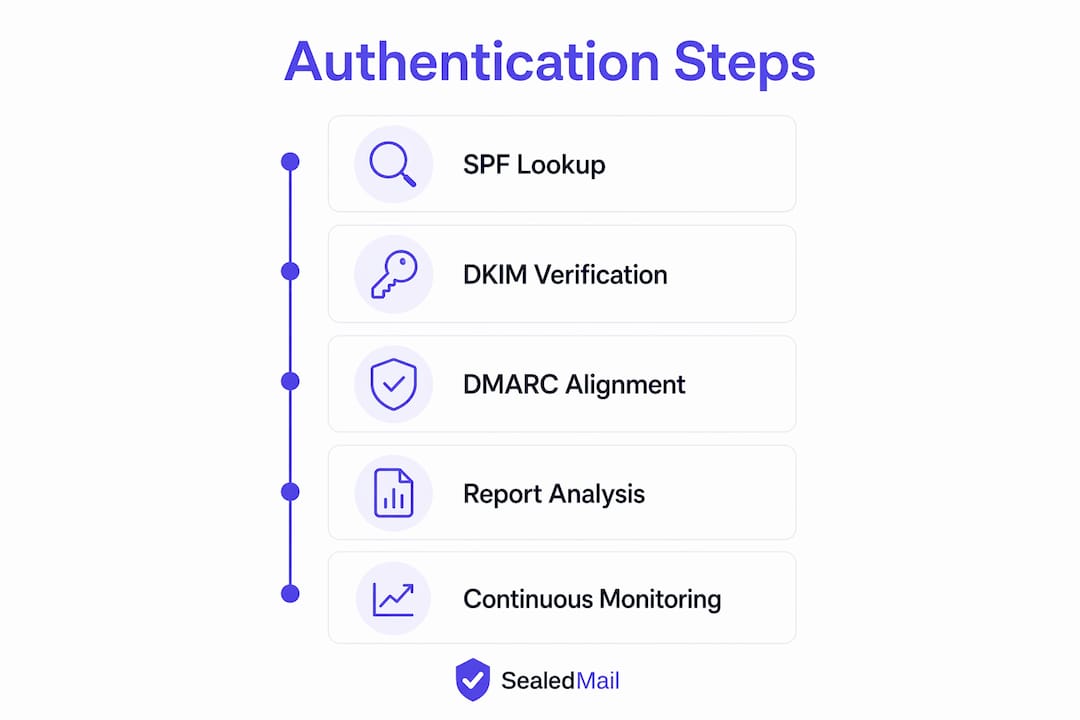
Step-by-step DNS and header checks:
- Query
TXT yourdomain.comand confirm the response containsv=spf1. Note everyinclude:mechanism and count the total DNS lookups — the limit is ten. - Query
TXT _dmarc.yourdomain.comand confirm the response starts withv=DMARC1. A record at the root domain is ignored by receivers. - Retrieve a DKIM selector from a sent message’s
DKIM-Signature: s=tag, then queryTXT <selector>._domainkey.yourdomain.comand confirm ap=key value is present. - Open the raw headers of a received copy of your own outbound mail and read the
Authentication-Resultsline — it will showspf=pass,dkim=passorfail, anddmarc=passorfail. - Cross-check DMARC alignment: the domain in the
Fromheader must match the domain validated by SPF or DKIM. Both can pass their individual checks while DMARC still fails if neither aligns with the visibleFromaddress.
What a quality checker should report:
| Output | What to look for |
|---|---|
| SPF mechanisms | All include: chains resolved, lookup count under 10, qualifier (~all or -all) present |
| DKIM selector | Key present, key length 1024 bits minimum (2048 preferred), selector matches headers |
| DMARC tags | v, p, rua, sp, pct, adkim, aspf all parsed and explained |
| Alignment status | Relaxed or strict, and whether From domain aligns with SPF or DKIM domain |
| Record placement | DMARC at _dmarc subdomain, not root |

Pro Tip: Use both a public checker and a command-line lookup. Cached DNS responses can make a broken record appear valid in a browser-based tool. The command line queries live DNS and shows what receivers actually see.
Common problems checkers flag and how to fix them
Most authentication failures fall into a small set of recurring categories. Knowing the cause makes the fix straightforward.
SPF problems:
- Too many DNS lookups. Each
include:,a,mx, andredirectmechanism counts toward the ten-lookup limit. Exceeding it causes a permanent SPF error, and if DKIM also fails alignment, DMARC fails too. Fix: flatten your SPF record by replacing nestedinclude:chains with explicit IP ranges, or use an SPF macro service. - Missing third-party senders. Marketing platforms, CRM tools, and invoice systems often send mail from your domain without being listed in SPF. Add their published SPF includes or IP ranges.
- Wrong qualifier.
~all(soft fail) is safer during rollout;-all(hard fail) is the target for enforced domains. Never use+all.
DKIM problems:
- Missing selector. If the selector referenced in outbound headers has no corresponding DNS record, DKIM fails for every message. Publish the key at
<selector>._domainkey.yourdomain.com. - Short keys. Keys shorter than 1024 bits are considered weak. Rotate to 2048-bit keys where your provider supports it.
- Unsigned third-party streams. Cloud platforms such as Microsoft 365 and Google Workspace require DKIM to be explicitly enabled — it is not on by default. Check each sending platform separately.
DMARC problems:
- Record at the wrong location. DMARC lookups target
_dmarc.yourdomain.com, not the root. A record published at the root is invisible to receivers. - Missing
rua. Without a reporting address, you receive no aggregate reports and cannot see what is failing. - Strict alignment causing false positives. If your From domain is
company.combut DKIM signs withmail.company.com, relaxed alignment (adkim=r) passes while strict (adkim=s) fails. Start with relaxed.
Warning: Moving directly to p=reject without first mapping all legitimate senders will block real business mail, including automated notifications, invoices, and third-party marketing. Never skip the monitoring phase.How should you move DMARC from monitoring to enforcement?
The NCSC advises a staged rollout: start at p=none to gather reports, map every legitimate sender, then progress to p=quarantine and finally p=reject only once you are confident all authorised mail streams pass authentication.
| Phase | Policy | Typical duration | Decision gate |
|---|---|---|---|
| 1. Monitor | p=none |
2–4 weeks minimum | All major senders identified in reports |
| 2. Partial quarantine | p=quarantine; pct=XX |
2–4 weeks | False positive rate near zero |
| 3. Full quarantine | p=quarantine |
2–4 weeks | No legitimate mail quarantined |
| 4. Reject | p=reject |
Ongoing | All senders aligned; rollback plan in place |
What to measure during each phase:
- Report coverage: are aggregate reports arriving from major receivers?
- Sender map: have you identified and authorised every IP sending mail for your domain?
- False positive rate: is any legitimate mail failing SPF or DKIM alignment?
- Subdomain policy: does
sp=need to differ from the main policy?
Pro Tip: Before moving to p=reject, prepare a rollback plan: document who holds DNS access, keep the previous record value noted, and maintain an incident contact list. A misconfigured enforcement policy can block business-critical mail within minutes of the DNS TTL expiring.
How do you choose the right DMARC monitoring service?
A one-off DKIM and SPF checker tells you the state of your records at a single moment. It cannot tell you when a new sending platform appears, when a key expires, or when an unauthorised sender starts spoofing your domain. That is why recurring monitoring matters more than any single check.
Selection checklist for IT teams:
- DNS probing frequency: daily or more frequent checks catch configuration drift before it causes failures
- Report parsing: aggregate (RUA) and forensic (RUF) report ingestion, with retention for audit purposes
- Plain English summaries: technical XML reports are hard to act on; expert translation is faster and reduces error
- Alerting: proactive notifications when new senders appear or policy violations spike
- Audit-ready evidence: compliance-ready records for regulators, insurers, or internal governance
- Sender mapping: proactive identification of all IPs sending for your domain, not just those you recognise
When to use managed monitoring versus free tools:
- Free tools (public checkers, command-line lookups) are appropriate for initial validation, one-off syntax checks, and learning the basics.
- Managed monitoring is appropriate when you need weekly operational visibility, compliance evidence, or support during a policy rollout to
p=reject. - For regulated sectors — legal, financial services, healthcare, accountancy — the audit trail and expert review that managed DMARC monitoring provides is difficult to replicate with free tools alone.
Pricing for managed services varies. Sealedmail’s subscription is £39 per domain per month, which covers weekly expert-reviewed reports, a free initial domain health check, and compliance-ready evidence — a practical cost shape for SMEs and mid-market organisations that lack a dedicated security analyst.
How do you interpret DMARC reports effectively?
Aggregate DMARC reports are XML files that receivers send to your rua address, typically once per day. Each report lists the sending IP addresses that claimed your domain, the volume of messages, and whether SPF and DKIM passed or failed for each source.
Reading them raw is tedious. The practical approach is to look for three things: sources you recognise passing cleanly, sources you recognise failing (a misconfiguration to fix), and sources you do not recognise at all (a spoofing or shadow-IT signal).
Failure reasons and what to do:
spf=fail, dkim=fail: the sending IP is not in your SPF record and no DKIM signature is present. Investigate whether this is a legitimate sender you have not yet authorised.spf=pass, dkim=fail, dmarc=fail: SPF passes but DKIM is missing or misaligned. Enable DKIM signing on that sending platform.spf=pass, dkim=pass, dmarc=fail: both pass but neither aligns with the From domain. Ask the sending vendor to sign with your domain’s DKIM key rather than their own.- Unrecognised IPs sending at volume: treat this as a spoofing attempt and investigate immediately.
Forensic reports (RUF) provide message-level detail, including headers and sometimes body content. Not all receivers send them, but when they arrive they are useful for diagnosing intermittent failures on specific mail streams.
Key takeaways
Running a thorough SPF, DKIM, and DMARC check requires DNS lookups, header inspection, and ongoing report analysis — a one-off tool covers the first two but not the third.
| Point | Details |
|---|---|
| Start with command-line checks | Use dig or nslookup to query live DNS; do not rely solely on browser-based tools. |
| Verify DMARC placement | The record must be at _dmarc.yourdomain.com, not the root domain. |
| Progress policy gradually | Move from p=none to p=quarantine to p=reject in phases, using reports as your decision gate. |
| Review reports regularly | Aggregate reports reveal unauthorised senders and misconfigurations that a one-off check cannot catch. |
| Sealedmail for managed monitoring | Weekly expert-reviewed reports at £39 per domain per month, with a free initial health check and audit-ready evidence. |
Why recurring monitoring matters more than a single check
Most IT teams run an SPF and DKIM check once, fix what they find, and move on. The problem is that email infrastructure changes constantly. A new marketing platform gets connected, a DKIM key expires quietly, or a third-party sender starts signing with the wrong domain. None of those changes trigger an alert unless something is watching.
The organisations that get caught out by business email compromise are rarely those with no authentication records at all. They are the ones with records that were correct six months ago and have since drifted. A p=none policy that was meant to be temporary stays in place for years because no one is reviewing the reports.
Weekly monitoring turns DMARC from a one-time configuration task into an operational control. It surfaces the things that matter: a new IP sending at volume, a selector that has stopped signing, an include: chain that has grown past the ten-lookup limit. Those are the signals that prevent incidents, not the initial setup.
For sectors with regulatory obligations — law firms, financial services, healthcare, accountancy — the audit evidence that comes from consistent, documented monitoring is also increasingly expected by insurers and compliance frameworks. A screenshot of a passing check from six months ago does not satisfy that requirement.
Sealedmail: weekly DMARC monitoring without the complexity
If your domain’s authentication records need more than a one-off check, Sealedmail delivers weekly expert-reviewed reports in plain English, covering DMARC, SPF, DKIM, TLS-RPT, MTA-STS, blacklist status, and BIMI health. Every report is personally reviewed by an expert, not generated by an automated dashboard, so you receive specific observations rather than raw XML.
The subscription is £39 per domain per month, with no long-term contract required and a free initial domain health check to get started. That health check identifies misconfigurations, missing records, and alignment issues before you commit to anything. Sealedmail serves law firms, financial services organisations, healthcare providers, accountants, and charities across the UK — sectors where domain reputation and compliance evidence carry real weight.
Start with a free domain health check and see exactly where your authentication stands.
Useful sources and further reading
- NCSC email security check — the UK’s national authority on email security; use this to run a free check against NCSC standards and access definitions of SPF, DKIM, and DMARC.
- NCSC: configure anti-spoofing controls — step-by-step NCSC guidance on staged DMARC rollout, including when to move from
p=noneto enforcement. - GOV.UK: set up government email services securely — the UK government’s own baseline for SPF, DKIM, and DMARC, including DNS record examples and DKIM key management guidance.
- Microsoft 365 and Google Workspace setup guides — practical walkthroughs for enabling DKIM and publishing DMARC records on both major cloud platforms.
- Sealedmail SPF monitoring — explains how ongoing SPF monitoring handles include chains and lookup limit issues that a one-off check misses.
FAQ
What is the fastest way to run an SPF DKIM DMARC check?
Run dig TXT yourdomain.com for SPF, dig TXT _dmarc.yourdomain.com for DMARC, and retrieve your DKIM selector from a sent message header before querying dig TXT <selector>._domainkey.yourdomain.com. The NCSC’s free email security check covers all three for UK domains.
Why does DMARC fail even when SPF and DKIM both pass?
DMARC requires that at least one of those authenticated domains aligns with the From address the recipient sees. If neither the SPF Return-Path domain nor the DKIM signing domain matches your From domain, DMARC fails regardless of individual pass results.
How long does a full DMARC rollout typically take?
A controlled rollout from p=none to p=reject takes a minimum of six to twelve weeks across four phases, as recommended by the NCSC. Rushing the timeline risks blocking legitimate business mail.
What do DMARC aggregate reports actually contain?
Aggregate reports are XML files listing every IP that sent mail claiming your domain, the message volume, and whether SPF and DKIM passed or failed for each source. They are the primary tool for identifying unauthorised senders and diagnosing misconfigurations.
When should you use managed monitoring instead of free tools?
Free tools are sufficient for one-off syntax checks and initial validation. Managed monitoring, such as Sealedmail at £39 per domain per month, is appropriate when you need weekly operational visibility, compliance-ready audit evidence, or expert support during a policy rollout to p=reject.
Recommended

Founder of SealedMail and a UK email-security specialist in DMARC, SPF, DKIM and email authentication for regulated sectors. He personally reads the DMARC and TLS reports behind every SealedMail account and writes the company's plain-English guides. More from Shaun Cooke →
