
How to stop email spoofing for UK domains in 2026

Stopping email spoofing requires deploying three DNS-based protocols in combination: SPF, DKIM, and DMARC. The NCSC recommends all three as the foundation of domain-level email authentication, supplemented by MTA-STS and TLS-RPT for transit security. No single protocol is sufficient on its own.
The core steps for UK domains are:
- Publish an SPF record listing every authorised sending IP address
- Enable DKIM signing on all mail-sending services and platforms
- Deploy a DMARC record, starting at
p=noneto monitor, then progressing top=quarantineand finallyp=reject - Implement MTA-STS to enforce encrypted mail transport and TLS-RPT to receive transport failure reports
- Review DMARC aggregate reports regularly and tune policy as new senders are identified
- Apply enforcement to parked and inactive domains, not just your primary sending domain
Done correctly, this layered approach blocks unauthenticated mail, reduces phishing and business email compromise risk, and supports compliance with UK regulatory requirements.
Why email spoofing is a serious risk for UK organisations

Email spoofing is the act of forging the sender address on an email to make it appear to come from a trusted domain. Attackers manipulate the From header in the message, which is entirely separate from the technical envelope used to route the mail. Recipients see a familiar address; the underlying sending infrastructure belongs to the attacker.
The goals are almost always financial or informational. Spoofed emails are the engine behind most business email compromise, directing staff to transfer funds, share credentials, or open malicious attachments. UK professional services firms are a frequent target because their email carries authority and urgency.

The regulatory dimension is equally pressing. A spoofed email sent in your organisation’s name can constitute a data breach under the UK GDPR and the Data Protection Act 2018, particularly where personal data is disclosed to an unauthorised party as a result. UK regulators including the SRA and FCA increasingly expect firms to demonstrate active email authentication controls as part of their information security frameworks. Spoofing is not just a technical nuisance. It creates direct legal exposure.
SPF alone does not solve the problem. SPF only verifies the sending IP address against your DNS record. An attacker can still forge the visible From header and pass SPF if they use a different envelope domain. DMARC closes that gap by requiring alignment between the authenticated domain and the address the recipient actually sees.
Core anti-spoofing protocols recommended by the NCSC
The NCSC’s email security guidance sets out three controls that work together to prevent domain spoofing.
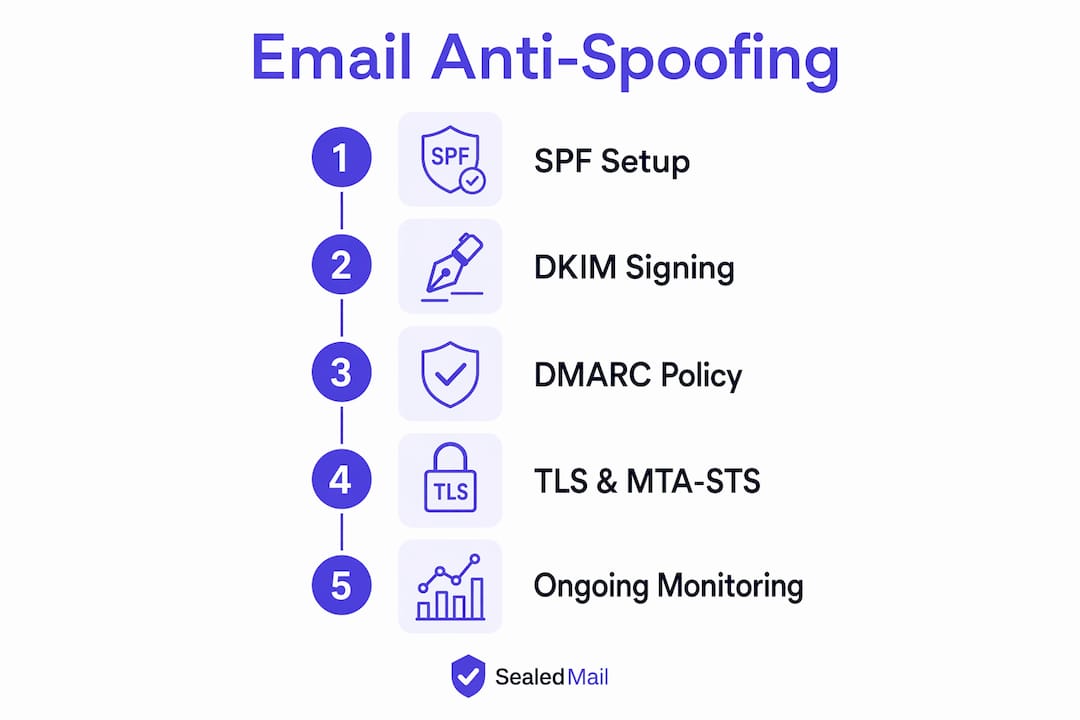
SPF (Sender Policy Framework) is a DNS TXT record that lists the IP addresses and services authorised to send mail for your domain. Receiving servers check this record and flag mail from unlisted sources. SPF has a hard limit of ten DNS lookups per record, and the record itself must stay within 450 bytes. Exceeding either limit breaks authentication silently, which is why using subdomains for distinct mail streams (marketing, transactional, internal) is recommended by the NCSC.
DKIM (DomainKeys Identified Mail) attaches a cryptographic signature to outgoing messages. The recipient’s server validates the signature against a public key published in your DNS. Unlike SPF, DKIM survives email forwarding because validation is based on message content rather than sending IP. Each mail platform you use requires its own DKIM selector and key pair, typically published as a CNAME record pointing to the provider’s infrastructure. Misconfigured or missing selectors are a common cause of delivery failures once DMARC enforcement is active.
DMARC (Domain-based Message Authentication, Reporting and Conformance) ties SPF and DKIM together by adding policy and reporting. It instructs receiving servers what to do when authentication fails: monitor (p=none), quarantine, or reject. Critically, DMARC also checks alignment, meaning the domain in the visible From header must match the domain validated by SPF or DKIM. Without alignment, an attacker can pass SPF using their own domain while spoofing yours in the header.
Phased DMARC deployment is the NCSC’s recommended approach:
- Start with
p=noneto collect aggregate reports without affecting mail flow - Identify all legitimate senders from the reports, including third-party platforms
- Confirm SPF and DKIM pass rates reach 100% for legitimate mail
- Move to
p=quarantine, monitor for two weeks, then progress top=reject
Pro Tip: Add sp=reject to your DMARC record to extend enforcement to subdomains. By default, DMARC only covers the exact domain in the record.
How TLS and MTA-STS protect email in transit
Authentication protocols protect your domain’s identity. Transit security protects the message itself while it travels between mail servers.
UK government guidance requires support for TLS v1.2 or later for all sending and receiving, plus a published MTA-STS policy for every domain that receives email. MTA-STS tells sending mail servers that your domain requires an encrypted TLS connection and will not accept downgrade to plaintext. Without it, a network attacker can strip TLS from the connection and intercept or modify messages in transit.
TLS-RPT (TLS Reporting) works alongside MTA-STS by sending failure reports when a TLS connection cannot be established. These reports arrive at an address you specify in a DNS TXT record and reveal whether legitimate mail is failing to reach you due to transport errors. Sealedmail’s TLS-RPT monitoring and MTA-STS monitoring services process these reports and flag issues in plain English, removing the need to parse raw XML data yourself.
Deploying MTA-STS and TLS-RPT alongside SPF, DKIM, and DMARC creates a complete perimeter: attackers cannot spoof your identity, and they cannot intercept mail in transit either.
UK email security providers: Trend Micro and Proofpoint compared
Two well-established providers serve UK enterprises requiring managed email security and anti-spoofing capabilities.
| Provider | Services offered | Specialisation | Recognition | Best for | Rating |
|---|---|---|---|---|---|
| Trend Micro (UK) Ltd. | Email security, endpoint protection, cloud security, threat intelligence | Broad cybersecurity coverage including email protection | Established UK presence across multiple security service lines | UK enterprises wanting integrated cybersecurity with email protection | 4.5★ (30 reviews) |
| Proofpoint Ltd | Email security, collaboration security, AI security, data security | AI-driven and human-centric enterprise security | Leader in 2025 Gartner Magic Quadrant for Email Security | Large enterprises requiring advanced AI-driven email threat protection | 4.5★ (15 reviews) |
Proofpoint’s positioning as a Gartner Magic Quadrant leader reflects its depth in AI-driven threat detection and its track record protecting large enterprise environments, including over 80 Fortune 100 companies. Its platform covers email security, collaboration security, and AI interaction auditing, making it a strong fit for organisations with complex, multi-platform environments.
Trend Micro brings a broad cybersecurity portfolio with a well-established UK presence. For organisations that want email security as part of a wider managed security programme rather than a standalone email-focused platform, Trend Micro’s integrated approach across endpoint, cloud, and email is worth considering.
Neither provider publishes standard pricing publicly. Both are enterprise-grade solutions typically sold through direct engagement or channel partners.
Expert insights on DMARC monitoring and ongoing management
The most common failure in anti-spoofing programmes is not a misconfigured record. It is staying in p=none indefinitely. Many UK organisations publish a DMARC record, collect reports, and never act on them. That is the equivalent of fitting a burglar alarm and never switching it on.
Effective monitoring requires reviewing DMARC aggregate reports at least weekly. The reports reveal which IP addresses are sending mail in your domain’s name, whether SPF and DKIM are passing, and whether any unexpected sources have appeared. Acting on that data is what drives the policy forward from monitoring to enforcement.
Key practices for ongoing management:
- Audit all third-party senders after any system change, including new CRM tools, payroll platforms, or marketing services
- Rotate DKIM keys annually and maintain two selectors (
selector1andselector2) to allow key rotation without downtime - Set up alerting for DMARC failures so IT teams are notified before a spoofing campaign escalates
- Combine DMARC enforcement with MFA to create a dual barrier: DMARC prevents sending spoofed mail, MFA prevents attackers from accessing legitimate mailboxes
- Use the free NCSC Email Security Check tool to validate your domain’s SPF, DKIM, DMARC, and transit security configuration at any time
For organisations without the internal resource to parse XML aggregate reports, Sealedmail’s DMARC monitoring service provides weekly reviews by a single expert who reads the data and delivers plain-English intelligence, covering DMARC, SPF, DKIM, TLS-RPT, MTA-STS, blacklist status, and BIMI health.
Configuring SPF, DKIM, and DMARC for UK domains: common pitfalls
The configuration sequence matters. Publish SPF and DKIM first, confirm they are passing for all legitimate senders, then add the DMARC record.
For SPF, the most frequent pitfalls are:
- Exceeding ten DNS lookups. Each
include:directive counts toward the limit. Use nested includes carefully or consolidate senders through fewer providers. - Multiple SPF records. Only one SPF TXT record per domain is valid. Merge duplicates using
include:syntax. - SPF alignment failures. If your
Header Fromdomain isexample.co.ukbut theEnvelope Fromusesoutlook.com, SPF alignment fails. Check alignment separately from the basic SPF pass result.
For DKIM, publish the selector record your mail provider specifies, usually as a CNAME pointing to their signing infrastructure. Verify the record resolves correctly before enabling signing. If you use Microsoft 365, DKIM must be explicitly enabled in the Security & Compliance Centre; it is not active by default.
For DMARC, the record goes in DNS as a TXT record at _dmarc.yourdomain.co.uk. Start with v=DMARC1; p=none; rua=mailto:[email protected] and register with the NCSC Mail Check service to receive processed aggregate reports. Progress to p=quarantine only after confirming legitimate mail passes consistently, then to p=reject after a further two-week review period.
Integrating anti-spoofing with UK email platforms
Most UK organisations run Microsoft 365 or Google Workspace, and both require explicit configuration steps rather than relying on platform defaults.
In Microsoft 365, navigate to the Security & Compliance Centre, then Threat Management, then Policy, then Anti-Phishing. Enable DKIM signing per domain under the Email Authentication settings. Add high-risk users such as finance and senior leadership to the User Impersonation Protection list. Set DMARC failure notifications so the security team receives alerts automatically.
Google Workspace requires DKIM to be generated and enabled in the Admin Console under Apps, then Google Workspace, then Gmail, then Authenticate Email. SPF records must include Google’s sending infrastructure (include:_spf.google.com). For organisations using additional sending services alongside either platform, each service must be authorised in SPF and have its own DKIM selector configured.
For UK financial services firms, FCA-aligned DMARC monitoring provides a structured way to maintain authentication evidence that meets regulatory expectations. Law firms working toward SRA compliance can find sector-specific guidance on DMARC for legal practices.
How to train UK staff to recognise spoofing attempts
Technical controls stop the majority of spoofed mail. User awareness catches what gets through, and it also addresses the social engineering that bypasses authentication entirely.
Training for UK organisations should cover:
- Recognising lookalike domains (e.g.
rnsubstituted form, or.coinstead of.co.uk) - Verifying unexpected payment requests or credential prompts through a separate channel before acting
- Reporting suspicious emails to the IT team rather than deleting them, so patterns can be identified
- Understanding that a familiar sender name does not guarantee a legitimate email address
Phishing simulation exercises, run quarterly, keep awareness current without requiring lengthy training sessions. The NCSC’s Exercise in a Box programme provides free, ready-made scenarios for UK organisations. Combine simulations with clear escalation procedures so staff know exactly who to contact when something looks wrong.
What to do after detecting a spoofing attack
When DMARC reports or user reports reveal active spoofing, the response has two tracks: contain the immediate threat and prevent recurrence.
Immediate steps:
- Identify the sending IP addresses from DMARC aggregate reports and check whether they belong to a legitimate but misconfigured service or an external attacker
- If the source is external, consider publishing a blocklist entry or contacting your email gateway provider to filter that IP range
- Alert staff to the active campaign with specific details about the spoofed address and what the emails are asking recipients to do
- If any recipients acted on the spoofed email, initiate a data breach assessment under UK GDPR Article 33, which requires notification to the ICO within 72 hours if the breach is likely to result in a risk to individuals
For recurrence prevention, the answer is almost always accelerating the move to p=reject. Review the DMARC reports to confirm all legitimate senders are authenticated, then progress the policy. If your DMARC policy is already at p=reject and spoofing is still occurring, check whether the attack is targeting a subdomain or a lookalike domain rather than your primary domain.
Tools for ongoing spoofing threat intelligence in the UK
Continuous monitoring requires a combination of automated reporting and periodic manual review.
The NCSC Mail Check service processes DMARC and TLS-RPT reports and provides alerts when issues arise. It is free for UK public sector organisations and recommended for private sector use. The NCSC Email Security Check tool gives an instant read on your domain’s authentication and transit security posture without requiring any software installation.
For Microsoft 365 environments, the Message Trace tool in the Security & Compliance Centre lets you filter for SPF Fail and DMARC Fail results. Exporting these weekly and reviewing them alongside DMARC aggregate reports gives a clear picture of any authentication gaps. Power Automate or Logic Apps can parse incoming DMARC XML reports and push alerts to Microsoft Teams when an unauthorised sender appears, giving the IT team real-time visibility.
UK professional services firms with audit obligations, including accountants and financial advisers, benefit from maintaining a documented record of DMARC policy progression and report reviews. Sealedmail’s service includes compliance-ready audit evidence as part of its weekly reporting, which supports firms working with UK audit readiness requirements.
Sealedmail: weekly DMARC monitoring without the complexity
If the providers above feel like more than your organisation needs, there is a more direct route.
Sealedmail delivers weekly DMARC monitoring for £39 per domain per month, reviewed by a single expert who reads your data personally and writes up the findings in plain English. No dashboards to learn, no XML to parse, no jargon. The service covers DMARC, SPF, DKIM, TLS-RPT, MTA-STS, blacklist status, and BIMI health in one weekly report, plus compliance-ready audit evidence for regulated sectors including law, financial services, healthcare, and accountancy.
Where Trend Micro and Proofpoint are built for large enterprise environments with dedicated security teams, Sealedmail is built for organisations that want expert eyes on their email authentication without the overhead of an enterprise platform. A free domain health check is available with no obligation, so you can see exactly where your domain stands before committing to anything.
FAQ
Why am I receiving so many spam emails in the UK?
Spam volumes increase when your domain lacks a DMARC enforcement policy, making it easier for attackers to spoof your address and for your domain to appear on spam lists. Publishing SPF, DKIM, and a DMARC p=reject policy reduces both inbound spoofed mail and the likelihood of your domain being used to send spam to others.
How do you block email spoofing?
Deploy SPF, DKIM, and DMARC on your domain, progressing DMARC from p=none to p=reject once all legitimate senders are authenticated. The NCSC recommends this layered approach as the primary technical control for blocking spoofed mail.
How do spoof emails get my address?
Attackers do not need access to your email account. They simply forge the From header in an outgoing message, which any mail server can do without authentication. DMARC enforcement prevents receiving servers from accepting those forged messages.
How do I tell if my email is being spoofed?
Use the free NCSC Email Security Check to test your domain’s authentication configuration, and review your DMARC aggregate reports for unexpected sending sources. Reports arriving shortly after publishing a DMARC record will show any IP addresses currently sending mail in your domain’s name.
Key takeaways
Stopping email spoofing for UK domains requires SPF, DKIM, and DMARC working together, enforced at p=reject and supported by transit security and continuous monitoring.
| Point | Details |
|---|---|
| Three protocols, not one | SPF, DKIM, and DMARC must all be configured and aligned; SPF alone does not prevent header spoofing. |
| Phase DMARC carefully | Start at p=none, confirm all senders pass, then move to p=quarantine and p=reject to block spoofed mail. |
| Secure the transport layer | MTA-STS and TLS-RPT protect mail in transit and are required under UK government email security guidance. |
| Monitor weekly | DMARC aggregate reports must be reviewed and acted on regularly; staying in p=none indefinitely provides no protection. |
| Sealedmail for managed monitoring | Sealedmail provides expert weekly DMARC and email authentication monitoring at £39 per domain per month, with plain-English reports and audit evidence for regulated UK sectors. |

Founder of SealedMail and a UK email-security specialist in DMARC, SPF, DKIM and email authentication for regulated sectors. He personally reads the DMARC and TLS reports behind every SealedMail account and writes the company's plain-English guides. More from Shaun Cooke →
