
How to check an SPF record: a 2026 guide for IT admins

TL;DR:Verifying your SPF record involves checking that exactly one DNS TXT record with “v=spf1” exists at your domain’s root.A proper SPF setup prevents domain spoofing, especially important as UK public sector bodies now require enforced email authentication policies.
Checking your SPF record means verifying that exactly one DNS TXT record starting with v=spf1 is published at your domain’s root, as required by RFC 7208. SPF, or Sender Policy Framework, is a foundational email authentication standard that sits alongside DKIM and DMARC to prevent domain spoofing. A misconfigured or missing SPF record leaves your domain open to impersonation, and UK public sector bodies including HMRC and NHS Digital now mandate enforced authentication policies for all email senders. This guide walks IT administrators through every stage of an SPF record check, from tooling and syntax to troubleshooting and DMARC integration.

How to check an SPF record: tools and prerequisites
Before you run any SPF lookup, you need a clear picture of what you are looking for. SPF records use DNS TXT records with mechanisms like ip4, include, and qualifiers such as -all or ~all to specify which servers are authorised to send mail on behalf of your domain. Every mechanism tells a receiving mail server what to do when it encounters a sending IP that matches or does not match the rule.
You also need a complete inventory of your legitimate sending sources before you validate anything. That means listing your own mail servers, third-party senders like marketing platforms or CRM tools, and any cloud services that send transactional email under your domain. Without this inventory, you cannot judge whether your SPF record is accurate or dangerously incomplete.
Command-line tools
The fastest way to retrieve an SPF record is via the command line. These commands work on Linux, macOS, and Windows (via WSL or PowerShell):
dig +short TXT yourdomain.com— returns all TXT records in a compact formatnslookup -type=TXT yourdomain.com— works on Windows and most Unix systemshost -t TXT yourdomain.com— a clean alternative on Linux
Command-line retrieval gives you the raw DNS response, which is the most reliable source of truth. Online SPF checkers add a graphical layer and often expand include: chains automatically, which saves time during audits.
Comparing your options
| Method | Strengths | Limitations |
|---|---|---|
dig / nslookup / host |
Raw DNS output, no third-party dependency | Manual lookup expansion required |
| Online SPF checker | Expands includes, counts lookups, flags errors | Relies on external service availability |
| DMARC reporting platform | Continuous monitoring, alerts on changes | Requires ongoing subscription |
Pro Tip: Always run a command-line query first to get the raw record, then use an online checker to expand and validate the full include chain. The two together catch errors that either method alone can miss.
Step-by-step process for verifying your SPF record
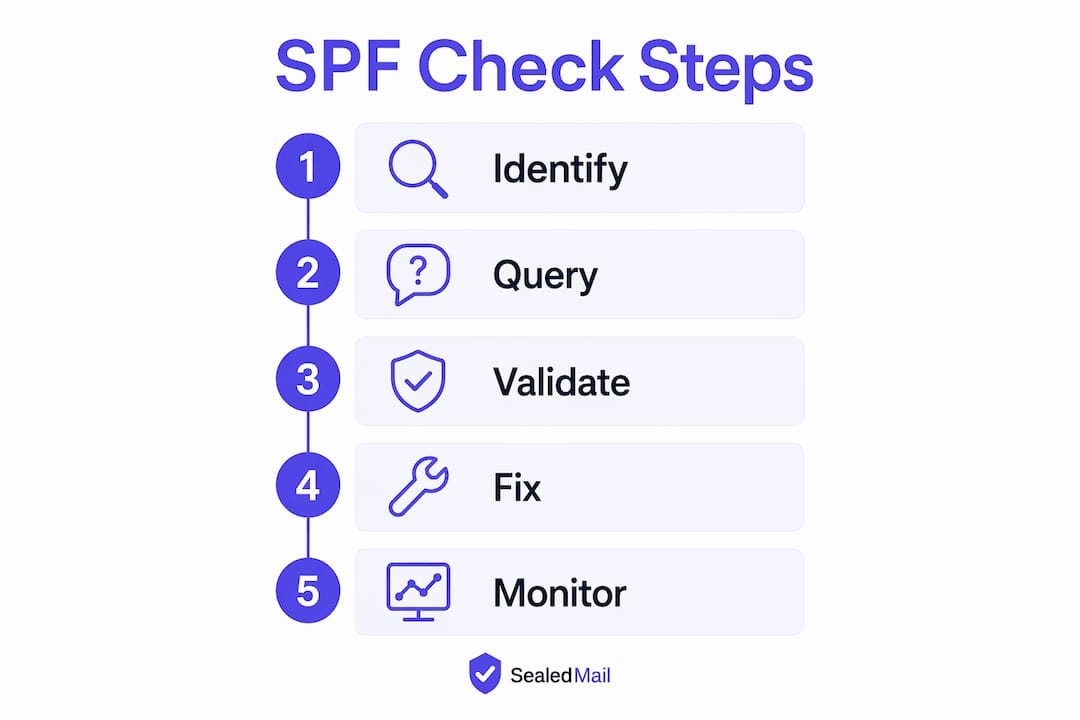
A thorough SPF record check follows a consistent sequence. Skipping steps is how misconfigurations persist undetected for months.
- Query your domain’s TXT records. Run
dig +short TXT yourdomain.comand look for a record beginning withv=spf1. Every other TXT record on the domain is irrelevant to SPF. - Confirm there is exactly one SPF record. Multiple SPF records cause a permanent error that invalidates authentication entirely. Receiving servers treat the duplicate as a
permerrorand reject or ignore SPF evaluation. If you find two records, merge them into one before doing anything else. - Expand every
include:mechanism. Eachinclude:points to another domain’s SPF record. You need to follow every chain to confirm that all listed senders are legitimate and current. Stale includes from decommissioned services are a common source of unnecessary DNS lookups. - Count your DNS lookups. SPF evaluation is limited to 10 DNS lookups. Exceeding this limit triggers another
permerror, which blocks authentication just as effectively as having no record at all. Eachinclude:,a:,mx:, andexists:mechanism counts as one lookup. - Analyse your ending qualifier. The final mechanism in your SPF record sets the default policy for all other senders.
-all(hardfail) instructs receivers to reject mail from unlisted sources.~all(softfail) marks it as suspicious but still delivers it.+allauthorises every server on the internet to send as your domain, which is never acceptable. - Test a specific IP against the record. Use an online SPF tester to submit a sending IP address and confirm whether it returns
pass,fail,softfail, orneutral. This confirms the record behaves as intended for your actual mail infrastructure.
Verification checklist
| Check | Expected result |
|---|---|
Single v=spf1 TXT record |
Exactly one record present |
| DNS lookup count | 10 or fewer |
| All includes verified | No stale or unknown senders |
| Ending qualifier | -all or ~all (never +all) |
| IP test result | pass for all legitimate senders |
Common SPF errors and how to fix them
Most SPF failures fall into a small number of repeatable patterns. Knowing them in advance cuts troubleshooting time significantly.
Multiple SPF records. Publishing two v=spf1 records on the same domain is the single most common configuration error. The fix is straightforward: merge all mechanisms into one record and delete the duplicate. There is no workaround for this. Receivers will not attempt to reconcile two records.
Exceeding 10 DNS lookups. This happens gradually as organisations add new sending services without auditing the existing record. Auditing SPF includes for stale or redundant domains and flattening the record by replacing include: chains with direct ip4: or ip6: entries reduces lookup count. Flattening requires maintenance whenever a third-party provider changes its IP ranges, so weigh the trade-off carefully.
Using +all. This qualifier tells every mail server in the world that it is authorised to send email as your domain. Using +all is insecure and completely undermines SPF. Replace it with ~all during testing or -all once you have confirmed all legitimate senders pass.
Deprecated mechanisms. The ptr mechanism is deprecated under RFC 7208 and should not appear in any current SPF record. Remove it and replace the intent with ip4: or ip6: entries.
Misconfigured includes and loops. An include: that points to a non-existent domain or creates a circular reference causes evaluation to fail. Check every included domain resolves correctly and does not reference your own domain in return.
Pro Tip: After fixing any SPF error, wait for DNS propagation (typically up to 48 hours) and then re-run both a command-line query and an online checker to confirm the corrected record is live and valid.
You can track the health of your SPF configuration over time with SPF monitoring, which alerts you when records change or errors appear.
Advanced best practices: SPF, DKIM, and DMARC working together
SPF alone does not fully protect your domain. SPF does not protect against From header spoofing or email forwarding. An attacker can craft a message that passes SPF but still displays a fraudulent sender address to the recipient. DMARC closes this gap by requiring alignment between the SPF-authenticated domain and the visible From header.
Publishing SPF without DMARC is like locking the back door and leaving the front door open. SPF authenticates the sending server, but DMARC enforces that the authenticated domain matches what the recipient actually sees. Without DMARC, spoofing remains viable even with a perfectly configured SPF record.
UK regulatory bodies and major email providers now mandate enforcement of SPF, DKIM, and DMARC together. HMRC, NHS Digital, and local councils require enforced authentication policies. This shifts email authentication from a best practice to essential infrastructure for any organisation operating in the UK public sector or regulated industries.
Best practices for a complete authentication posture include:
- Publish null SPF records on non-sending domains. Domains that do not send email should publish
v=spf1 -allto prevent attackers from exploiting them for spoofing campaigns. - Deploy DKIM alongside SPF. DKIM signs the message body and headers cryptographically. DKIM monitoring confirms that signing keys remain valid and have not been rotated without notice.
- Set DMARC to enforcement. Move from
p=none(monitoring only) top=quarantineorp=rejectonce you have confirmed all legitimate senders pass both SPF and DKIM alignment. DMARC monitoring provides the visibility needed to make this transition safely. - Audit sending sources quarterly. Third-party services change their sending infrastructure without always notifying customers. A quarterly audit of your SPF includes catches stale entries before they cause deliverability problems.
- Use DMARC aggregate reports. These XML reports show which sources are sending as your domain, whether they pass or fail, and in what volume. The NCSC Mail Check service provides this visibility for UK public sector organisations.
Initial SPF policies should use ~all (softfail) for two to four weeks while you audit all sending sources, then move to -all (hardfail) once you are confident the record is complete. Rushing to -all before the audit is complete risks blocking legitimate mail.
Key takeaways
A correctly configured SPF record requires exactly one v=spf1 TXT record, no more than 10 DNS lookups, and a -all or ~all qualifier. SPF without DMARC leaves the From header unprotected and spoofing viable.
| Point | Details |
|---|---|
| One record only | Multiple SPF records cause permerror; merge duplicates into a single TXT record. |
| Stay under 10 lookups | Flatten includes and remove stale entries to avoid authentication failure from lookup limits. |
Never use +all |
This qualifier authorises every server on the internet; use ~all for testing and -all for production. |
| SPF needs DMARC | SPF alone cannot prevent From header spoofing; DMARC alignment is required for full protection. |
| Protect non-sending domains | Publish v=spf1 -all on domains that do not send email to block spoofing from unused domains. |
SPF checking in 2026: what I have learned from the field
The technical steps for an SPF record check have not changed dramatically in recent years. What has changed is the consequence of getting it wrong. When I started working with email authentication, a misconfigured SPF record was an inconvenience. Now, with HMRC and NHS Digital mandating enforced DMARC policies, a permerror on your SPF record can mean your domain fails compliance checks and your mail gets rejected at the gateway.
The thing I see most often is organisations that set up SPF correctly at launch and then never touch it again. Three years later, they have added a CRM, a marketing platform, and a cloud helpdesk, none of which are in the SPF record. The record passes a basic check because the syntax is valid, but it fails in practice because half the legitimate mail is coming from unlisted sources.
My honest advice: treat your SPF record like a firewall ruleset. Review it every quarter. Every time you onboard a new sending service, update the record before the service goes live. And do not move to -all until you have run DMARC in monitoring mode long enough to be certain you have found every sending source.
The balance between strictness and deliverability is real, but it is not as difficult as it sounds. ~all during the audit phase, -all once you are confident. That two-step approach has never failed me.
— Shaun
How Sealedmail supports your SPF and DMARC compliance
Keeping SPF, DKIM, and DMARC correctly configured is not a one-time task. Sending infrastructure changes, third-party providers rotate IP ranges, and DNS records drift over time. Sealedmail monitors your domain’s email authentication services continuously, alerting you when SPF records change, DKIM keys expire, or DMARC policy gaps appear.
Every week, a single expert reviews your DMARC data and sends you a plain-English report. No dashboards to interpret, no alerts to triage alone. For organisations in law, finance, healthcare, and the public sector, this means staying ahead of UK compliance requirements without adding to your team’s workload. Sealedmail’s service covers SPF, DKIM, and DMARC monitoring for £39 per domain per month.
FAQ
What does it mean to check an SPF record?
Checking an SPF record means querying your domain’s DNS TXT records to confirm a single valid v=spf1 entry exists, lists all authorised senders, and uses a safe ending qualifier such as -all or ~all.
How many DNS lookups does SPF allow?
SPF allows a maximum of 10 DNS lookups during evaluation. Exceeding this limit causes a permerror, which invalidates authentication and can result in mail being rejected.
What is the difference between ~all and -all?
~all (softfail) marks mail from unlisted servers as suspicious but still delivers it. -all (hardfail) instructs receiving servers to reject mail from any server not listed in the SPF record.
Can SPF stop all email spoofing on its own?
No. SPF authenticates the sending server but does not protect the visible From header. DMARC is required to enforce alignment between the authenticated domain and the address the recipient sees.
Do non-sending domains need an SPF record?
Yes. Domains that do not send email should publish v=spf1 -all to prevent attackers from using them in spoofing campaigns.
Recommended

Founder of SealedMail and a UK email-security specialist in DMARC, SPF, DKIM and email authentication for regulated sectors. He personally reads the DMARC and TLS reports behind every SealedMail account and writes the company's plain-English guides. More from Shaun Cooke →
