
Fully qualified domain name: the email security guide

TL;DR:A fully qualified domain name is the complete, unambiguous address of a host used in DNS and email authentication. Proper FQDN management is essential for DMARC, SPF, and DKIM alignment, ensuring domain security and reliable email delivery.
A fully qualified domain name (FQDN) is the complete, unambiguous address of a host in DNS, written as hostname.domain.tld. — and in email authentication, it is the identifier that DMARC, SPF, and DKIM use to decide whether a message is genuine or spoofed.
- DMARC alignment compares the FQDN in your DKIM
d=tag or SPF Return-Path against the visible From header domain. Get that wrong and legitimate mail fails, or worse, spoofed mail passes. - Monitoring and auditing depend on having a canonical FQDN recorded for every mail source. Without that inventory, you cannot reliably attribute sending behaviour or investigate incidents.
Table of Contents
- What is a fully qualified domain name?
- How FQDNs drive SPF, DKIM, and DMARC alignment
- How do you verify FQDNs and DNS records in practice?
- Common FQDN misconfigurations that break email authentication
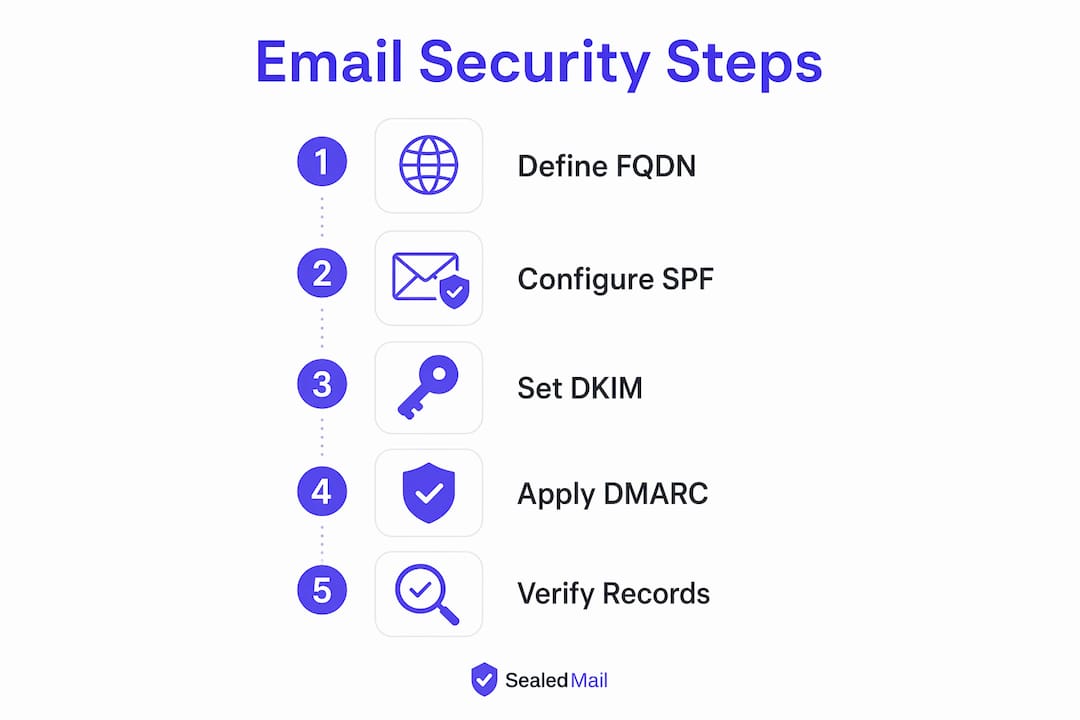
- Actionable checklist for UK businesses managing authenticated email
- How to migrate from relaxed to strict alignment safely
- Why FQDN hygiene matters for regulated UK businesses
- Key takeaways
- A note on what the data actually shows
- How Sealedmail supports FQDN auditing and DMARC monitoring
- Useful sources and verification tools
- FAQ
What is a fully qualified domain name?
An FQDN has three labelled parts, read right to left in DNS: the top-level domain (TLD), the second-level domain, and the hostname. Take mail.example.com. as the standard example:
| Component | Example value | Role in email configuration |
|---|---|---|
| Hostname | mail |
Identifies the specific server; appears in MX, A, and SMTP HELO |
| Second-level domain | example |
The organisational domain; used in DMARC policy lookup |
| TLD | com |
Registry-level identifier; part of the public suffix |
| Trailing dot | . |
Denotes the DNS root; makes the name absolute |
Character rules worth knowing: labels may contain letters, digits, and hyphens; each label is limited to 63 characters; the total FQDN length must not exceed 253 characters. DKIM selectors follow the same label rules, so a selector like _domainkey.example.com. is a valid FQDN.
Pro Tip: In DNS zone files, always append the trailing dot to MX and CNAME targets. Without it, the resolver treats the name as relative to the zone origin, which can produce broken names like mail.example.com.example.com. that are nearly impossible to spot without a zone audit.
How FQDNs drive SPF, DKIM, and DMARC alignment
RFC 7489 defines DMARC’s core purpose: ensuring the domain in the visible From header aligns with an authenticated identifier from either SPF or DKIM. A valid signature from an unrelated domain does not satisfy DMARC, because DMARC evaluates domain identifiers, not message content.

The practical difference between strict and relaxed matters enormously for businesses using subdomains or third-party senders.
DKIM alignment example:
- From:
[email protected] - DKIM
d=mail.example.com - Relaxed: pass (same organisational domain)
- Strict (
adkim=s): fail (subdomain does not exactly matchexample.com)
SPF / Return-Path alignment example:
- From:
[email protected] - Return-Path:
[email protected] - Relaxed (
aspf=r): pass - Strict (
aspf=s): fail
The key takeaway: DMARC alignment requires at least one of SPF or DKIM to align. DKIM-only alignment is common and perfectly valid, but the d= FQDN must be set correctly in your signing configuration.
How do you verify FQDNs and DNS records in practice?
Start with what the check tells you, then run the command.
MX and A records confirm which hostnames are authorised to receive mail and whether they resolve to the correct IP. Run dig MX example.com or nslookup -type=MX example.com. The MX target should be a fully qualified hostname with a trailing dot in the zone file.
SPF record lists authorised sending sources. Run dig TXT example.com and look for the v=spf1 string. Check that every include: or ip4: entry matches a known sending host FQDN or IP range.
DKIM selector confirms the public key is published. Run dig TXT 2026jan._domainkey.example.com. A missing or mismatched record here causes DKIM failures that automated reports may not explain clearly.
SMTP HELO/EHLO banner reveals the FQDN your mail server presents to receiving servers. Connect with openssl s_client -connect mail.example.com:25 -starttls smtp and read the banner. It should match the PTR record for the sending IP.
Audit checklist for email authentication readiness:
- Confirm MX records resolve to FQDNs with correct A records.
- Verify SPF TXT record lists all authorised senders and ends with
-allor~all. - Check every active DKIM selector resolves and the key matches your signing configuration.
- Confirm the SMTP HELO name matches the PTR record for the sending IP.
- Retrieve your DMARC TXT record (
dig TXT _dmarc.example.com) and confirmrua=points to a monitored address. - Check for CNAME chains in MX or DKIM targets — each hop is a potential point of failure.
Watch for these errors in outputs: CNAME targets without a trailing dot, MX records pointing to IP addresses rather than hostnames, and DKIM selectors returning NXDOMAIN after a key rotation.
Common FQDN misconfigurations that break email authentication
Most DMARC failures trace back to a small set of recurring mistakes:
- Missing trailing dot in zone files. An MX or CNAME target written as
mail.example.cominstead ofmail.example.com.becomesmail.example.com.example.com.after zone expansion. - CNAME chaining on DKIM selectors. Some DNS providers use CNAMEs to delegate DKIM keys. If any link in the chain lacks a trailing dot or resolves slowly, DKIM verification fails intermittently.
- Using the bare organisational domain as the SMTP HELO name. The HELO name should be the specific mail host FQDN, not just
example.com. - DKIM
d=selector mismatch. Signing withd=mail.example.comwhile the From header shows@example.comfails under strict alignment. - Shared third-party sending without subdomain delegation. When a marketing platform signs with its own domain and your SPF record includes its IP range, alignment can pass for SPF but fail for DKIM, or vice versa, depending on policy.
A concrete failure pattern: a firm sets adkim=s (strict) and their CRM signs outbound mail with d=crm.thirdparty.com. Every message from the CRM fails DMARC, even though DKIM itself is valid. The fix is not to relax the policy globally but to delegate a subdomain.
Pro Tip: When onboarding a third-party sender, delegate a subdomain such as send.example.com with its own SPF, DKIM, and DMARC records. This keeps the parent domain’s authentication clean and lets you apply strict alignment without disrupting other mail streams.
Actionable checklist for UK businesses managing authenticated email
| Task | Owner | Timeline |
|---|---|---|
| Inventory all mail-sending hosts and record canonical FQDNs | DNS admin | Week 1 |
Publish or update SPF, DKIM selectors, and DMARC at p=none |
DNS admin | Week 1–2 |
| Verify SMTP HELO names and PTR records for each host | Security lead | Week 2 |
| Delegate subdomains for third-party senders | DNS admin + vendor | Week 2–3 |
Enable DMARC aggregate report (rua) delivery and review |
Security owner | Week 2 onwards |
| Add TLS-RPT and MTA-STS records | DNS admin | Week 3–4 |
| Schedule weekly DMARC report review | Named security owner | Ongoing |
For organisations managing multiple client domains, maintaining a domain register with canonical FQDNs, DKIM selectors, and policy states per domain is the only reliable way to track authentication health at scale.
How to migrate from relaxed to strict alignment safely
A stepwise approach avoids mail disruption and gives you measurable evidence at each stage.
- Stage 1 — Monitor (
p=none). Publish DMARC withp=noneand arua=address. Collect aggregate reports for at least two to four weeks. Identify all sending sources, their FQDNs, and whether DKIM and SPF align. - Stage 2 — Fix alignment gaps. Correct DKIM
d=values, delegate subdomains for third-party senders, and update SPF records. Track the DMARC pass rate in aggregate reports; aim for a consistent pass rate before moving on. - Stage 3 — Quarantine (
p=quarantine). Move failing mail to spam rather than rejecting it. Monitor for legitimate sources that surface only occasionally, such as mailing lists or automated notifications. - Stage 4 — Reject (
p=reject). Once aggregate reports show no legitimate sources failing, enforce rejection. At this point, DMARC policy progression is data-driven, not a calendar decision.
For third-party senders, the safest path is always a dedicated subdomain with its own authentication records, independent of the apex domain policy.
Why FQDN hygiene matters for regulated UK businesses
Consistent, auditable FQDN usage delivers benefits that go well beyond deliverability:
- Improved deliverability. Receiving servers trust mail from hosts with clean PTR records, matching HELO names, and valid DKIM signatures.
- Auditable sender identity. A canonical FQDN per mail source means every sending event is attributable, which matters during FCA reviews, ICO investigations, or SRA audits.
- Faster incident investigation. When a phishing campaign spoofs your domain, SMTP logs tied to specific FQDNs let you isolate the source quickly.
- Stronger anti-phishing posture. Unique FQDN usage makes it harder for attackers to hide behind generic hostnames that blend into your sending infrastructure.
Law firms in particular face reputational risk from email impersonation; email fraud monitoring tied to correct FQDN records gives incident response teams the evidence they need quickly.
Key takeaways
Correct FQDN management is the prerequisite for reliable DMARC alignment, and without it, SPF and DKIM records alone cannot prevent domain spoofing.
| Point | Details |
|---|---|
| FQDN structure | Every mail host needs a canonical FQDN: hostname, domain, TLD, and trailing dot in zone files. |
| Alignment modes | Strict alignment requires an exact FQDN match; relaxed allows organisational-domain matches per RFC 7489. |
| Verification commands | Use dig, nslookup, and openssl s_client to confirm MX, SPF, DKIM selectors, and SMTP banners. |
| Policy progression | Move from p=none to p=quarantine to p=reject only after aggregate reports confirm no legitimate sources are failing. |
| Sealedmail monitoring | Sealedmail reviews DMARC aggregate reports weekly and flags FQDN mismatches and alignment failures in plain English. |
A note on what the data actually shows
Most businesses that come to Sealedmail for a domain health check have SPF and DKIM records in place. The problem is almost never a missing record. It is a misaligned one: a DKIM selector pointing to a decommissioned key, an MX target without a trailing dot that has quietly been resolving incorrectly for months, or a third-party sender signing with its own domain while the DMARC policy sits at p=none and nobody is reading the aggregate reports.
The pattern repeats across sectors. A firm tightens its DMARC policy to quarantine, and a batch of automated notifications from an internal system starts landing in spam. The system was never in the FQDN inventory. Weekly human review of aggregate reports catches these edge cases before they become delivery incidents. Automated rules alone do not.
How Sealedmail supports FQDN auditing and DMARC monitoring
Sealedmail’s DMARC monitoring service covers the full authentication picture: DMARC, SPF, DKIM, TLS-RPT, MTA-STS, blacklist status, and BIMI health, reviewed each week by an expert and delivered in plain English with no dashboards to manage. The weekly report flags FQDN mismatches, misaligned selectors, and new sending sources before they cause delivery problems or compliance gaps. Every report is compliance-ready audit evidence.
The service starts with a free domain health check that covers your DNS records, SMTP banners, and DMARC policy state. Ongoing monitoring is £39 per domain per month, with no long-term contract. For financial services firms, the service maps directly to FCA operational resilience expectations around email security for financial services.
Useful sources and verification tools
- RFC 7489 (DMARC) — the authoritative specification for DMARC alignment rules, policy tags, and aggregate reporting.
- RFC 8616 — updates SPF, DKIM, and DMARC for internationalised domain names.
digandnslookup— built-in tools on Linux/macOS and Windows for MX, TXT, and A record lookups.openssl s_client— verifies SMTP TLS and reads HELO banners directly.
| Tool | Best for |
|---|---|
dig TXT _dmarc.example.com |
Retrieve and inspect DMARC policy record |
dig TXT selector._domainkey.example.com |
Verify DKIM selector is published and correct |
| MXToolbox (mxtoolbox.com) | Quick MX, SPF, and blacklist lookup via browser |
| DMARC Analyser / dmarcian | Parsing and visualising aggregate rua reports |
DMARC aggregate reports arrive as XML files at the rua= address you publish. A monitoring service such as Sealedmail parses these automatically and surfaces the findings in a weekly plain-English report, which is where human-reviewed DMARC data adds context that raw XML cannot.
FAQ
What is a fully qualified domain name in email?
An FQDN in email is the complete hostname used to identify a mail server or signing domain, such as mail.example.com.. It appears in MX records, SMTP HELO banners, and DKIM d= tags, and must be correctly formed for DMARC alignment to work.
What is the difference between strict and relaxed DMARC alignment?
Strict alignment requires the DKIM d= or SPF Return-Path domain to exactly match the From header domain. Relaxed alignment, the default, allows a subdomain of the same organisational domain to match, per RFC 7489.
Why does the trailing dot matter in DNS?
The trailing dot marks a name as absolute in DNS. Without it in a zone file, a resolver appends the zone origin, which can produce incorrect FQDNs and break MX or DKIM records silently.
How do I check my DKIM selector is published correctly?
Run dig TXT yourselector._domainkey.yourdomain.com and confirm the response contains a v=DKIM1 TXT record with a valid public key. A missing response usually means the selector was not published or has not propagated yet.
When should a UK business move to p=reject?
Move to p=reject only after DMARC aggregate reports consistently show no legitimate mail sources failing alignment. Sealedmail’s weekly monitoring tracks this progression and advises when the evidence supports tightening the policy.
Recommended

Founder of SealedMail and a UK email-security specialist in DMARC, SPF, DKIM and email authentication for regulated sectors. He personally reads the DMARC and TLS reports behind every SealedMail account and writes the company's plain-English guides. More from Shaun Cooke →
