
Email domain health check: guide for domain administrators

An email domain health check is a structured technical audit that verifies SPF, DKIM, DMARC, MX records, TLS/MTA-STS configuration, and blacklist status, then returns a prioritised list of fixes you can act on promptly. Run one now if you have not done so recently. The three things to do first:
- Confirm you have a DMARC record with an
ruatag pointing to a monitored reporting address. - Check your SPF record for syntax errors and count the DNS lookups (which should be kept within recommended limits).
- Verify that at least one active DKIM selector is signing outbound mail and that the key length meets current security best practices.
Ownership matters here. DNS changes belong to whoever manages your zone file, typically your IT operations team or a managed DNS provider. DMARC report analysis belongs to your security lead or a specialist monitoring service. If those two roles sit with different people, agree a handoff before you start.
Table of Contents
- What does a complete email domain health check actually test?
- How do you run a proper email domain health check?
- How do you read results and prioritise fixes?
- What are the most common fixes and how do you apply them?
- Why does continuous monitoring matter more than a one-off check?
- How do UK NCSC and government guidelines apply to your domain?
- Sealedmail: expert-reviewed monitoring for UK domains
- Key takeaways
- The checks most teams get wrong
- Sealedmail: plain English monitoring, starting with a free check
- Useful sources
- FAQ
What does a complete email domain health check actually test?
A thorough domain health report runs across eight distinct check categories. Domain health tools perform DNS, email, blacklist, and SMTP tests and present a combined report, but knowing what each check verifies helps you read the results critically rather than just accepting a traffic-light score.
- SPF record existence and lookup count (Critical): Confirms a TXT record exists at your root domain and that the chain of
includedirectives resolves in ten or fewer DNS lookups. Exceeding ten causes a PermError, which means receiving servers may treat your mail as unauthenticated. SPF proves which servers are authorised to send on your behalf. - DKIM selectors and key length (Critical): Checks that at least one selector record exists in DNS, that the public key is valid, and that the key length is 2048 bits or more. A 1024-bit key is considered weak by current standards. DKIM attaches a cryptographic signature to each message, allowing receivers to verify the content has not been altered in transit.
- DMARC record and rua/ruf handling (Critical): Verifies a
_dmarcTXT record exists, that the policy is set (p=none,p=quarantine, orp=reject), and that theruatag points to a reachable address. Without a monitoredruaaddress, aggregate reports go unread and unauthorised senders remain invisible. DMARC ties SPF and DKIM together and instructs receivers how to handle failures. - MX record correctness (Critical): Confirms MX records exist, resolve to valid hostnames, and that those hostnames have A or AAAA records. Missing or broken MX records mean inbound mail bounces, which is an immediate operational failure.
- SMTP connectivity and PTR (reverse DNS) (High): Tests that your mail server accepts connections on port 25 and that the sending IP has a PTR record matching its forward DNS. Many receiving servers reject or score down mail from IPs without a matching PTR.
- TLS and MTA-STS/TLS-RPT presence (High): Checks that your server supports TLS v1.2 or later and that you have published an MTA-STS policy and a TLS-RPT record. GOV.UK guidance requires TLS v1.2 or later and recommends publishing MTA-STS and reviewing TLS-RPT reports for domains that receive email from partners.
- Blacklist checks (High): Queries major DNS-based blacklists (DNSBLs) to confirm your sending IPs and domain are not listed. A single listing on a widely-used blocklist can silently route your mail to spam across thousands of organisations.
- BIMI and reputation signals (Info): Checks whether a BIMI record exists and whether your domain has a verified mark certificate. BIMI is not a deliverability requirement, but it signals a mature authentication posture and can improve brand recognition in supporting mail clients.
Statistic callout: The NCSC recommends implementing SPF, DKIM, DMARC, TLS, and MTA-STS as the baseline for email security for UK organisations. Organisations that skip any one of these controls leave a gap that spoofing and interception attacks routinely exploit.
How do you run a proper email domain health check?
Running the check yourself requires combining automated online tools with a handful of command-line queries. Here is a reproducible workflow.
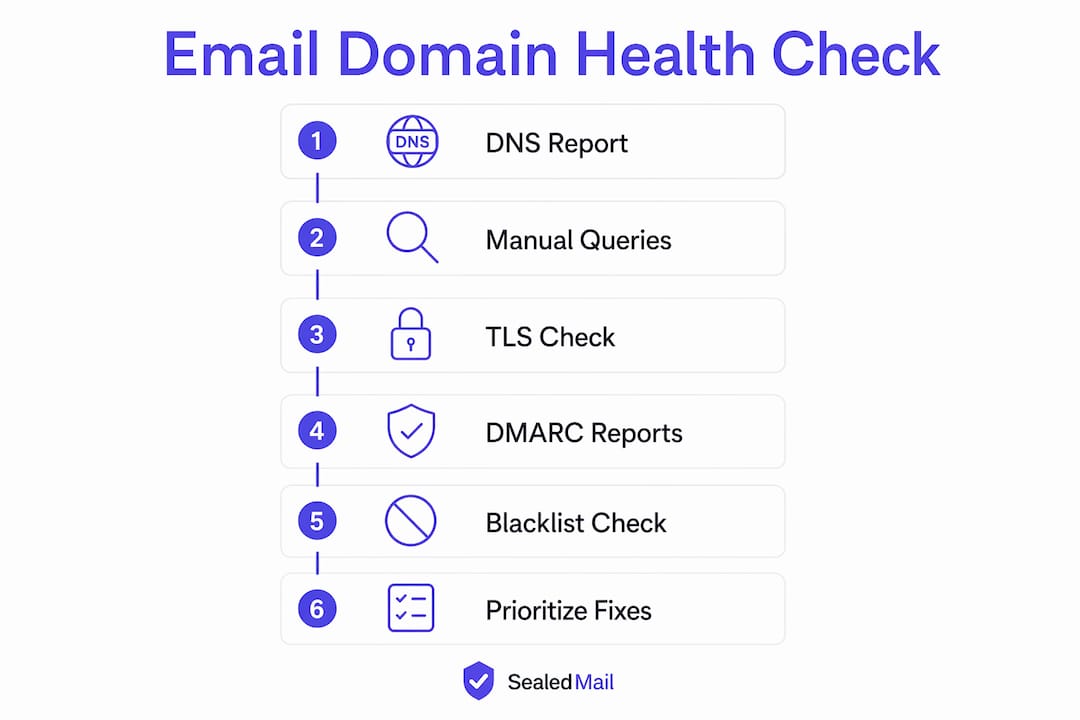
Step 1: Run an automated DNS and authentication report
Use an online domain health checker (search for “domain health checker” or “MX toolbox”) and enter your root domain. The tool will return SPF, DKIM, DMARC, MX, and blacklist results in one pass. Save or export the report as your baseline evidence.

Step 2: Query DNS records manually
Confirm the automated results with native tools. On Linux or macOS:
dig TXT yourdomain.com          # SPF and DMARC records
dig TXT selector._domainkey.yourdomain.com   # DKIM selector
dig MX yourdomain.com           # MX records
dig -x <sending IP>             # PTR record
On Windows, replace dig with nslookup -type=TXT yourdomain.com.
Step 3: Send a test message and inspect the headers
Send a message from your mail system to a monitoring mailbox (a Gmail or Outlook account works). Open the raw headers and look for:
Authentication-Results:— the receiving server’s verdict on SPF, DKIM, and DMARC alignment.Received-SPF:— should readpass.DKIM-Signature:— confirms signing is active and shows the selector used.ARC-Authentication-Results:— relevant if mail passes through a forwarding or gateway service.
Step 4: Check TLS behaviour
Test your server’s TLS configuration with OpenSSL:
openssl s_client -starttls smtp -connect mail.yourdomain.com:25
Confirm the negotiated protocol is TLS 1.2 or 1.3 and that the certificate chain is valid.

Step 5: Collect DMARC aggregate reports
If your rua address has been active for at least 24 hours, you will have received XML aggregate reports from major mailbox providers. Parse these with a DMARC report reader to identify which sources are sending on your domain and whether they are passing or failing. Email verifier tools can also help reduce bounce rates before bulk sends by validating recipient addresses at the SMTP level.
Step 6: Check blacklists and MTA-STS
Query your sending IPs against major DNSBLs. Then fetch your MTA-STS policy file at https://mta-sts.yourdomain.com/.well-known/mta-sts.txt and confirm it lists your MX hosts and sets mode: enforce (or testing if you are still validating).
The checks to run at each step:
- SPF: syntax, lookup count,
~allvs-allqualifier - DKIM: selector existence, key length, signing active
- DMARC: record present, policy level,
ruareachable - MX: records resolve, no missing A records
- PTR: sending IP has matching reverse DNS
- TLS: version, certificate validity, MTA-STS policy file
- Blacklists: sending IPs clean on major DNSBLs
- BIMI: record present, VMC status
How do you read results and prioritise fixes?
Not every failure carries the same urgency. Use this triage matrix to sequence your remediation work.
| Priority | Issue examples | Action window | DNS propagation note |
|---|---|---|---|
| Critical | Missing DMARC record, broken MX, DMARC p=reject failures from legitimate senders |
Immediate (same day) | TTL-dependent; set TTL to 300 before changes, revert after |
| High | SPF syntax error, DKIM signing absent, PTR mismatch, blacklist listing | Within hours | Most changes visible within 1 hour at low TTL |
| Medium | DKIM key rotation overdue, MTA-STS in testing mode, TLS-RPT not published |
Within days | MTA-STS policy cache TTL can be up to 604800 seconds (7 days) |
| Low | BIMI record missing, reputation recovery after delisting, DMARC policy ramp from none to quarantine |
Weeks | Reputation recovery at mailbox providers typically takes 2–4 weeks of clean sending |
A few practical notes on timelines. DNS TTL is the single biggest variable: if your records have a TTL of 86400 (24 hours), a fix you publish now will not be universally visible until tomorrow. Lower TTLs to 300 seconds before making changes, then restore them once the new record is confirmed. DKIM key rotation should be staged: publish the new selector, confirm it signs correctly, then retire the old one after 48 hours to allow in-flight messages to be verified.
Escalate to your security or legal team when DMARC aggregate reports show a new, unrecognised source sending at volume on your domain. That pattern is consistent with active spoofing or a compromised third-party integration, and it warrants investigation rather than a routine DNS fix. Schedule a maintenance window for any change that touches MX records or MTA-STS policy mode, since both affect mail flow directly.
What are the most common fixes and how do you apply them?
Fixing SPF
- Count your current DNS lookups using a lookup-counting tool. Each
include:,a:,mx:, andptr:mechanism adds to the count. - Remove any
include:for services you no longer use. - Where you have multiple includes for the same provider, consolidate them.
- If you still exceed ten lookups, flatten the record by replacing
include:directives with the resolved IP ranges usingip4:orip6:mechanisms. Note that flattened records need updating whenever a provider changes their IP ranges. - End your record with
-all(hard fail) once you are confident all legitimate senders are listed. Use~all(soft fail) during transition.
Example SPF record structure (adapt to your senders):
v=spf1 ip4:203.0.113.0/24 include:mail.provider.com -all
Fixing DKIM
- Generate a 2048-bit RSA key pair using your mail platform’s tooling or
openssl genrsa. - Publish the public key as a TXT record at
selector._domainkey.yourdomain.com. - Configure your mail server or sending platform to sign outbound messages with the private key using the chosen selector name.
- Send a test message and confirm
DKIM-Signature:appears in the headers withv=1; a=rsa-sha256.
Pro Tip: Use a selector name that includes a date or version number (for example 2026a) so you can track when keys were rotated and avoid confusion when running multiple selectors simultaneously.
Fixing DMARC
- Start with
p=noneand a monitoredruaaddress:v=DMARC1; p=none; rua=mailto:[email protected] - Collect aggregate reports for at least two weeks before changing the policy.
- Once all legitimate senders pass SPF or DKIM alignment, move to
p=quarantine. - After a further two to four weeks of clean reports, move to
p=reject.
Third-party sender inventory
Before enforcing DMARC, list every service that sends mail on your domain: CRM platforms, marketing tools, helpdesk systems, invoicing software, and any cloud application with email notifications. For each one, either add an SPF include: for their sending infrastructure, configure DKIM signing via their platform using a subdomain selector, or move their sending to a dedicated subdomain with its own SPF and DMARC policy. Unrecognised senders in your DMARC aggregate reports are the most common cause of enforcement failures.
MX, PTR, and TLS
- For MX: confirm records point to your actual mail server hostnames, not IP addresses directly.
- For PTR: contact your hosting or ISP provider to set reverse DNS for each sending IP.
- For TLS: disable TLS 1.0 and 1.1 at your mail server and confirm TLS 1.2 and 1.3 are enabled.
Why does continuous monitoring matter more than a one-off check?
A single health check gives you a snapshot. Email authentication is an ongoing maintenance task: third-party integrations frequently introduce misconfigurations that only surface in DMARC aggregate reports weeks after a new service is connected. Domain reputation is often invisible to administrators, and silent routing to spam is a common failure mode that monitoring and DMARC reporting are the primary ways to detect early.
The recommended monitoring cadence:
- DMARC aggregate reports: process daily. Reports arrive from major mailbox providers overnight; reviewing them each morning catches new unauthorised senders before they cause reputational damage.
- Blacklist checks: query hourly or at least every four hours. A listing can appear without warning after a single spam complaint spike.
- TLS-RPT reports: review weekly. These reveal delivery failures caused by TLS negotiation problems between your domain and partner mail servers.
- MTA-STS policy: audit monthly. Confirm the policy file is reachable, the mode is correct, and the listed MX hosts match your current configuration.
- Full authentication audit: quarterly. Re-run the complete health check workflow, including manual DNS queries and test message header inspection.
Alerting should trigger immediately when: DMARC aggregate reports show a sudden increase in authentication failures from your primary sending IP, a new unrecognised source appears sending at volume, any sending IP is listed on a major DNSBL, or TLS-RPT reports show a sustained delivery failure rate to a partner domain.
Pro Tip: Assign DMARC report review to a named individual with a calendar reminder, not a shared inbox that nobody owns. Reports that sit unread for weeks defeat the purpose of monitoring entirely.
Deliverability also depends on sending patterns. Mailbox providers may throttle or block high-volume sends outside typical business hours, which harms your domain’s reputation over time. Maintaining steady volumes during UK business hours reduces that risk. For teams managing effective message timing. Aligning send windows with recipient activity patterns supports both deliverability and engagement.
How do UK NCSC and government guidelines apply to your domain?
The NCSC email security guidance sets a clear baseline for UK organisations: implement SPF, DKIM, DMARC, TLS, and MTA-STS, and review reports regularly. This is not aspirational guidance; it is the minimum expected configuration for any organisation handling sensitive communications.
For regulated sectors, the practical implications go further. Healthcare organisations subject to the NHS Data Security and Protection Toolkit are expected to implement DMARC, DKIM, and SPF and to retain reporting data as audit evidence. Financial services firms regulated by the FCA face similar expectations around demonstrating control over outbound communications. Law firms handling client data under SRA obligations have a clear interest in preventing impersonation of their domain.
Compliance checklist for regulated organisations:
- SPF published and syntax-valid
- DKIM signing active with 2048-bit keys
- DMARC at
p=quarantineorp=reject(notp=noneindefinitely) - TLS v1.2 or later enforced at your mail server
- MTA-STS policy published and in
enforcemode - TLS-RPT record published and reports reviewed
- DMARC aggregate reports retained for a minimum of 12 months as audit evidence
- Review frequency: monthly for operational teams, quarterly for security leads
The NCSC’s email security check tool allows you to test your domain directly against these criteria and produces a report you can share with auditors or senior management.
Sealedmail: expert-reviewed monitoring for UK domains
For organisations that want more than a one-off scan, Sealedmail provides weekly expert-reviewed reports covering every check in this guide. The service is built specifically for UK businesses in regulated sectors, including law firms, financial services, healthcare, accountants, and charities.
What the Sealedmail monitoring service includes:
- Weekly DMARC aggregate report processing and expert review
- SPF, DKIM, and DMARC authentication checks
- MTA-STS and TLS-RPT monitoring
- Blacklist alerts for sending IPs and domain
- BIMI status tracking
- Compliance-ready audit evidence in plain English
- Reports written by a single named expert, not generated by an automated dashboard
Pricing is available per domain per month, with flexible contract options. A free initial domain health check is available with no obligation, giving you an immediate view of your current authentication posture before committing to ongoing monitoring.
Key takeaways
A complete email domain health check requires SPF, DKIM, DMARC, MX, TLS/MTA-STS, and blacklist verification, followed by continuous monitoring to catch misconfigurations before they affect deliverability.
| Point | Details |
|---|---|
| Start with DMARC monitoring | Publish an rua tag and assign a named person to review aggregate reports daily. |
| Fix SPF and DKIM first | Resolve syntax errors and confirm 2048-bit DKIM signing before moving DMARC to enforcement. |
| Enforce DMARC in stages | Progress from p=none to p=quarantine to p=reject over four to eight weeks of clean reports. |
| Monitor continuously, not once | Blacklist listings and new unauthorised senders appear without warning; hourly blacklist checks and daily DMARC review catch them early. |
| Sealedmail for ongoing assurance | Sealedmail delivers weekly expert-reviewed reports covering DMARC, SPF, DKIM, TLS-RPT, MTA-STS, and blacklists at £39 per domain per month. |
The checks most teams get wrong
Most domain administrators run a health check once, fix the obvious failures, and move on. That approach misses the most common real-world failure pattern: a third-party service is connected to the domain months later, it sends mail using the primary domain without a matching DKIM selector, and DMARC aggregate reports quietly accumulate failures that nobody reads.
The second pattern is subtler. A team enforces DMARC at p=reject without first completing a full third-party sender inventory. Legitimate mail from a CRM or invoicing platform starts bouncing. The instinctive response is to roll back to p=none, which removes all protection. The correct response is to identify the failing sender in the aggregate reports, authorise it properly, and then re-enforce. That distinction is the difference between a security control that works and one that gets disabled under pressure.
Forgotten subdomains are another persistent blind spot. A subdomain used for a marketing campaign two years ago may still have a permissive SPF record and no DMARC policy, making it trivially easy to spoof. A quarterly audit that includes all subdomains, not just the root domain, closes that gap.
For teams adopting monitoring for the first time, the single most useful step is not the tooling choice. It is assigning a named individual to own the weekly report review. Monitoring without a human decision-maker in the loop is just data accumulation.
Sealedmail: plain English monitoring, starting with a free check
Running a health check tells you where you stand today. What protects your domain tomorrow is what happens after the report: who reads the DMARC data, who acts on a new blacklist listing at 2 AM, and who notices when a third-party sender starts failing authentication.
Sealedmail handles that operational layer for UK organisations at £39 per domain per month. A single named expert reviews your DMARC aggregate reports each week, checks your SPF, DKIM, MTA-STS, TLS-RPT, and blacklist status, and delivers a plain English summary with any actions clearly flagged. There are no dashboards to interpret and no jargon to decode. Sector-specific reports are available for law firms, financial services, and healthcare organisations with compliance evidence mapped to relevant regulatory frameworks.
Start with the free domain health check to get an immediate view of your current authentication posture, then decide whether ongoing DMARC monitoring is the right next step.
Useful sources
| Source | Why it is relevant |
|---|---|
| NCSC email security and anti-spoofing collection | The authoritative UK government baseline for SPF, DKIM, DMARC, TLS, and MTA-STS implementation. |
| NCSC email security check tool | Free tool to test your domain against NCSC criteria and generate a shareable report for auditors. |
| GOV.UK: securing government email | Mandates TLS v1.2 or later and recommends MTA-STS and TLS-RPT for domains receiving partner email. |
| NHS England Digital: email server software guidance | Sector-specific requirement for DMARC, DKIM, SPF, and audit-ready reporting in healthcare. |
| DMARC.org specification | The technical specification for DMARC, covering rua/ruf tags, policy levels, and alignment modes. |
Retain DMARC aggregate reports and TLS-RPT data for a minimum of 12 months where your organisation is subject to regulatory audit requirements. These reports constitute evidence of control and are increasingly requested during NHS DSPT assessments and FCA-related reviews.
FAQ
How do you check domain health for email?
Run an automated domain health checker against your root domain to test SPF, DKIM, DMARC, MX, and blacklist status in one pass, then confirm results manually using dig or nslookup and inspect raw message headers from a test send.
How do you check the domain of an email address?
The domain is the portion after the @ symbol. To verify its mail configuration, query its MX records using dig MX domain.com or nslookup -type=MX domain.com, which returns the hostnames responsible for receiving mail.
How do you check if an email address is valid in the UK?
Syntactic validity can be checked with any email verifier tool, which confirms the address format and queries the domain’s MX records. SMTP-level verification goes further by connecting to the mail server to confirm the mailbox exists, though many servers disable this to prevent harvesting.
What is the difference between a one-off check and continuous monitoring?
A one-off check gives you a point-in-time snapshot of your authentication posture. Continuous monitoring, such as daily DMARC aggregate report processing and hourly blacklist queries, catches new misconfigurations and unauthorised senders as they appear, which a single check cannot do.
Does Microsoft 365 or Google Workspace handle DMARC automatically?
Neither platform configures DMARC on your behalf. Outbound protection requires you to publish a DMARC record manually, point the rua tag to a monitored address, and review aggregate reports to detect unauthorised senders, as the NCSC guidance makes clear.
Recommended

Founder of SealedMail and a UK email-security specialist in DMARC, SPF, DKIM and email authentication for regulated sectors. He personally reads the DMARC and TLS reports behind every SealedMail account and writes the company's plain-English guides. More from Shaun Cooke →
