
DKIM fail explained: causes, fixes, and best practices

TL;DR:A DKIM fail occurs when the recipient’s server cannot verify the email’s cryptographic signature, indicating possible tampering or configuration issues. Most failures result from missing or incorrect DNS records, key mismatches, or message modifications after signing. Regular monitoring, proper DNS setup, and cautious key rotation help prevent and resolve DKIM authentication problems.
A DKIM fail is defined as the receiving mail server’s inability to verify the cryptographic signature attached to an inbound email, signalling either message tampering or a configuration error. DKIM, which stands for DomainKeys Identified Mail, is standardised under RFC 6376 and forms a critical layer of the email authentication stack alongside SPF and DMARC. When a DKIM failure occurs, receiving servers may reject the message, route it to spam, or flag it as unauthenticated. The UK’s National Cyber Security Centre (NCSC) lists DKIM as a minimum control for public sector email, making DKIM authentication issues a compliance concern as much as a technical one.
What causes a DKIM fail?

DKIM failures fall into several distinct categories, and identifying the correct one saves significant diagnostic time. The most common cause is a missing or incorrectly published DNS public key record. DKIM enabled but the public key absent from DNS is the single most frequent failure mode administrators encounter. Enabling DKIM signing on your mail platform means nothing if the corresponding TXT record is not live in DNS.
Other common causes include:
- Private/public key mismatch. The signing key used by your mail server does not match the public key published in DNS. This typically follows a key rotation where the old selector was overwritten rather than replaced.
- Body hash mismatch. The email body was modified after signing. Message modifications after signing, such as gateway disclaimers, link rewriting, or footer insertion, invalidate the body hash and produce a failed DKIM check.
- Incorrect selector configuration. The
s=value in the DKIM-Signature header points to a selector that does not exist in DNS, or the selector record is malformed. - DNS propagation delays. A newly published or updated TXT record may not be globally visible for up to 48–72 hours depending on TTL settings and recursive resolver caches.
- Canonicalisation mode set to “simple.” Simple canonicalisation is unforgiving. Any whitespace change or header reformat breaks the signature. Relaxed canonicalisation tolerates minor variations.
- Forwarding and mailing lists. Intermediaries frequently alter message content, breaking the original signature. This is one of the most misunderstood DKIM failure reasons in production environments.
Pro Tip: Set your canonicalisation mode to relaxed/relaxed when you first configure DKIM. It reduces false failures caused by trivial header or whitespace changes introduced by mail transfer agents.
How do you read DKIM fail results in email headers?
Diagnosing a DKIM authentication issue starts with the Authentication-Results header. Every major receiving server writes its verdict there. The three key result values are:
- dkim=fail. The signature was present but verification failed. The body hash or key comparison did not match.
- dkim=permerror. A permanent error, most often caused by a malformed DNS record. Truncated or improperly split TXT records by DNS providers produce this result.
- dkim=temperror. A transient DNS lookup failure. The receiving server could not retrieve the public key at the time of delivery. Retry delivery usually resolves this.
Once you have the result, locate the DKIM-Signature header in the raw message. Note the d= value (the signing domain) and the s= value (the selector). Run a DNS query to confirm the TXT record exists:
dig TXT selector._domainkey.yourdomain.co.uk
If the record returns nothing, the public key is missing. If it returns a malformed string, check whether your DNS provider has split the base64 key across multiple strings without proper concatenation.
Check your mail server logs for signing errors at send time. A signing failure upstream means the DKIM-Signature header may be absent entirely, which receiving servers treat as a failed DKIM check by default.
DKIM alignment with DMARC is a separate but related issue. DKIM does not guarantee DMARC alignment unless the d= domain in the DKIM signature matches the visible From: domain. A message can pass DKIM verification and still fail DMARC if the domains differ. This distinction catches many administrators off guard.
Pro Tip: Always check both the Authentication-Results header and the raw DKIM-Signature header together. The result header tells you what happened; the signature header tells you where to look in DNS.
How to fix and prevent DKIM failures
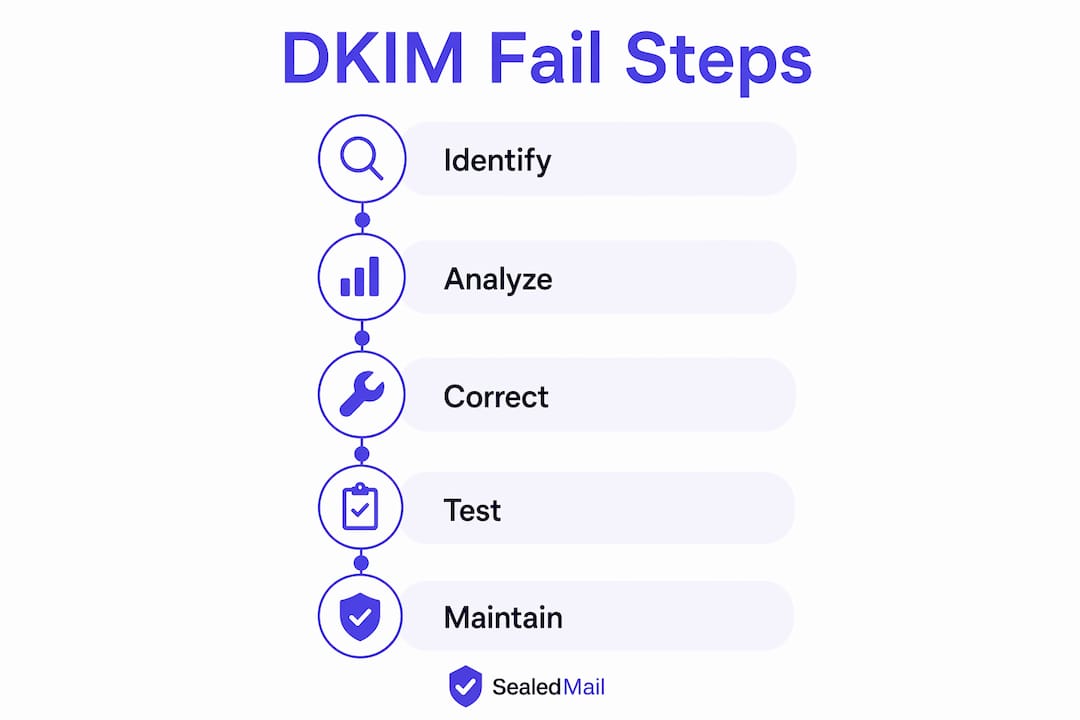
Resolving a DKIM failure requires working through the authentication stack methodically. The following practices address both immediate fixes and long-term reliability.
- Publish a correctly formatted DNS TXT record. The record must follow the format
v=DKIM1; k=rsa; p=<base64key>. Verify the full string is present and not truncated. Some DNS management interfaces silently split long strings, producing a permerror on delivery. - Use 2048-bit RSA keys or stronger. The current minimum recommended key length is 2048-bit RSA. Major providers treat 1024-bit keys as marginal in 2026. Ed25519 keys are an alternative where supported.
- Rotate keys using distinct selectors. Key rotation should occur at least every 6–12 months. Publish the new selector and key first, update your mail server to sign with the new selector, then retire the old one. Never overwrite an active selector mid-rotation.
- Switch to relaxed canonicalisation. Using relaxed/relaxed canonicalisation prevents signature breaks caused by trivial whitespace or header edits introduced by intermediaries.
- Implement ARC for forwarding scenarios. Authenticated Received Chain (ARC) is an emerging standard that preserves authentication status across forwarding chains. It allows downstream servers to trust the original authentication result even when DKIM breaks due to message modification.
- Reduce DNS TTL before making changes. Lowering TTL to 300 seconds (five minutes) before a key rotation or record update means changes propagate faster. Restore the TTL to a higher value once the new record is confirmed globally.
- Monitor continuously. DNS changes can take minutes to 48 hours to propagate globally. Monitoring tools that check DKIM health on a scheduled basis catch failures before they affect mail flow at scale.
The NCSC mandates DKIM as a minimum control for public sector email, with quarterly key rotations becoming standard practice. Organisations in financial services, healthcare, and legal sectors face similar expectations from regulators and clients alike.
Common pitfalls causing persistent DKIM failures
Some DKIM failures persist because the root cause sits outside the obvious configuration points. These are the scenarios that consume the most diagnostic time.
- DNS providers splitting TXT records incorrectly. Long DKIM public keys exceed 255 characters. DNS requires these to be split into multiple quoted strings within a single TXT record. Some control panels handle this automatically but incorrectly, producing a malformed key that causes a permerror on every delivery attempt.
- Multiple sending services with conflicting selectors. Organisations using several email platforms (marketing tools, transactional services, and a primary mail server) often end up with selector conflicts or unsigned mail from one service. Each sending platform needs its own selector and published key.
- Misaligned signing domain causing DMARC failures. A third-party sending service may sign with its own domain rather than yours. DMARC alignment failure occurs when the DKIM
d=domain differs from the visibleFrom:domain, even when DKIM itself passes. The fix is to configure the sending service to sign with your domain. - Intermediaries appending content after signing. Gateways such as Microsoft 365, Mimecast, and Barracuda add footers, subject prefixes, or rewrap messages after the original DKIM signature is applied. The result is a body hash mismatch at the receiving end. ARC or relaxed canonicalisation reduces the impact, but the cleanest fix is to ensure signing happens as close to delivery as possible.
- Premature key changes during propagation. Administrators who see a DKIM failure and immediately update the DNS record often compound the problem. DNS propagation can take up to 48–72 hours. Changing the record again before the first change has propagated creates a window where neither key is reliably available.
Pro Tip: To isolate whether a gateway is causing the failure, send a test message directly from your mail server to an external address, bypassing any intermediary. If DKIM passes on the direct send but fails through the gateway, the modification is happening downstream of your signing configuration.
Key takeaways
A DKIM fail is almost always traceable to one of four root causes: a missing or malformed DNS record, a key mismatch, message modification after signing, or a DMARC alignment error between the signing domain and the visible From address.
| Point | Details |
|---|---|
| Missing DNS record | Enabling DKIM signing without publishing the public key TXT record causes immediate failures on every delivery. |
| Key length matters | Use 2048-bit RSA or Ed25519 keys; 1024-bit keys are considered marginal by major providers in 2026. |
| Canonicalisation choice | Set relaxed/relaxed to prevent signature breaks from minor whitespace or header changes by intermediaries. |
| Selector rotation | Publish new selectors before retiring old ones to avoid in-flight failures during key rotation. |
| DMARC alignment | DKIM passing does not guarantee DMARC passing; the signing domain must match the visible From domain. |
Why I think most teams fix the wrong thing first
When I work through a DKIM failure with an IT team, the instinct is almost always to go straight to the DNS record. That is the right instinct about half the time. The other half, the record is fine. The problem is sitting in a mail gateway, a third-party sending platform, or a canonicalisation setting that nobody touched when the configuration was first deployed.
The thing that surprises administrators most is that DKIM can pass and DMARC can still fail. Those are two separate checks, and conflating them wastes hours. I have seen organisations spend days rotating keys and republishing records when the actual issue was a marketing platform signing with its own domain rather than the client’s.
The other underestimated problem is propagation patience. Changing a DNS record and then checking for results ten minutes later tells you nothing useful. Recursive DNS caching means changes can take up to 48 hours to reach all resolvers globally. Changing the record again because it “hasn’t worked yet” creates a second problem on top of the first.
My recommendation for any team managing more than one sending platform is to treat DKIM monitoring as a continuous process rather than a one-time configuration task. Key rotation, new service onboarding, and DNS migrations all create windows of failure. You need visibility into what is happening across all selectors, not just the one you configured last month.
The organisations that handle this well are the ones where the DNS team and the mail team talk to each other regularly. That sounds obvious. In practice, it is rare.
— Shaun
How Sealedmail supports DKIM and DMARC health
DKIM failures are rarely isolated events. They surface as part of a broader pattern that only becomes visible when you monitor authentication results across your full mail flow over time.
Sealedmail’s DMARC monitoring service gives IT administrators and email managers a clear, weekly view of what is passing and failing across every sending source on your domain. The service is reviewed by a single expert who reads the data and reports back in plain English, without the noise of automated dashboards that require interpretation. For £39 per domain per month, you get early warning of DKIM failures, misaligned selectors, and unauthorised senders before they affect deliverability or trigger a security incident. It is particularly well suited to law firms, financial services organisations, healthcare providers, and accountancy practices where email integrity is non-negotiable.
FAQ
What does dkim=fail mean in email headers?
dkim=fail means the receiving server found a DKIM signature but could not verify it. The most common causes are a body hash mismatch, a key mismatch between the signing key and the DNS public key, or a malformed DNS record.
How long does it take to fix a DKIM failure?
Hands-on configuration changes typically take 20–40 minutes, but DNS propagation can take up to 48–72 hours before the fix is globally effective. Avoid making further changes during that window.
Can DKIM pass but DMARC still fail?
Yes. DKIM passing does not guarantee DMARC passing. DMARC requires the DKIM signing domain (d=) to align with the visible From: domain. If they differ, DMARC fails even when DKIM verifies successfully.
What is the difference between dkim=permerror and dkim=temperror?
dkim=permerror indicates a permanent configuration problem, most often a malformed or truncated DNS TXT record. dkim=temperror indicates a transient DNS lookup failure that may resolve on retry without any configuration change.
How often should DKIM keys be rotated?
DKIM keys should be rotated at least every 6–12 months. Always publish the new selector and key before retiring the old one to prevent failures for messages in transit during the changeover.
Recommended

Founder of SealedMail and a UK email-security specialist in DMARC, SPF, DKIM and email authentication for regulated sectors. He personally reads the DMARC and TLS reports behind every SealedMail account and writes the company's plain-English guides. More from Shaun Cooke →
