
DKIM check: a complete guide for IT teams and business owners

TL;DR:A DKIM check verifies that your domain’s DKIM record is correctly published and that outgoing emails are properly signed. Regularly monitoring both DNS records and live email headers is essential to maintain email security and deliverability.
A DKIM check is the process of verifying that your domain’s DomainKeys Identified Mail record is correctly published in DNS and actively signing outgoing messages. Without a passing DKIM validation, your emails risk being filtered as spam or rejected outright by receiving mail servers. Google and Yahoo mandated DKIM for domains sending 5,000 or more emails per day from 2024, with Microsoft following in 2025. DKIM works alongside SPF and DMARC to form the three-pillar framework that protects your domain from spoofing and phishing. Getting this right is not optional for any UK business that depends on email.

What do you need before running a DKIM check?
Before you run any DKIM lookup, you need two pieces of information: your DKIM selector and your domain name. The selector is a label your mail provider assigns to identify which public key to use. Common selectors include google, selector1, selector2, and k1, depending on your mail platform.
You also need a way to query DNS. Three tool types cover most scenarios:
- Command-line tools: The
digcommand on Linux and macOS, ornslookupon Windows, queries DNS directly. These are free, fast, and give raw output. - Online DKIM checkers: Web-based tools let you enter a selector and domain, then return a formatted result. They suit teams without command-line access.
- Email header inspection: Sending a test message to an external inbox and reading the
Authentication-Resultsheader confirms whether live signing is working.
| Tool type | Best for | Output format |
|---|---|---|
dig command |
IT professionals needing raw DNS data | Plain text TXT record |
| Online DKIM checker | Business owners, quick audits | Formatted pass/fail result |
| Email header inspection | Confirming live mail flow signing | Header field with dkim=pass or dkim=fail |
Pro Tip: If you do not know your selector, log into your mail platform’s admin console. Google Workspace uses google, Microsoft 365 uses selector1 and selector2, and most third-party platforms display the selector in their DNS setup instructions.
How to perform a DKIM check step by step
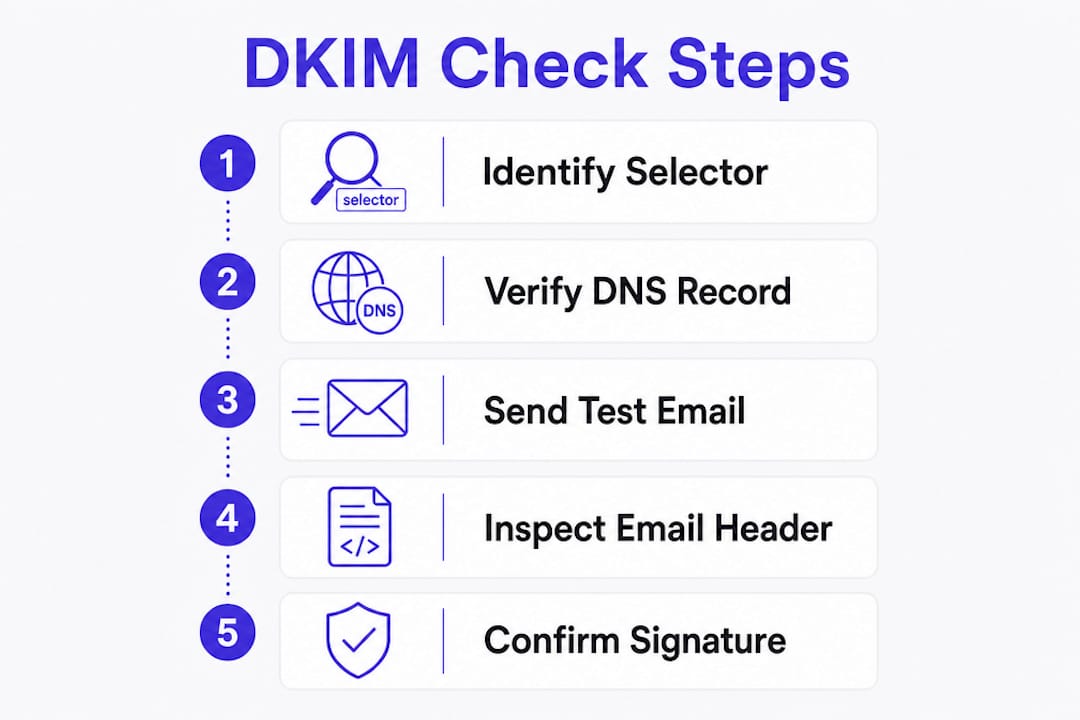
A thorough DKIM check requires both DNS record verification and live test email sending with header analysis to confirm end-to-end signing. Checking DNS alone tells you the record exists. It does not confirm your mail server is actually using it.
Using the dig command
- Open a terminal on Linux or macOS.
- Run the following command, replacing
selectorandyourdomain.co.ukwith your actual values:dig TXT selector._domainkey.yourdomain.co.uk +short - A valid response returns a long string beginning with
v=DKIM1; k=rsa; p=followed by your public key data. - If the response is empty, the record does not exist in DNS. If
p=is present but empty, the key has been deliberately revoked and will cause all verification attempts to fail. - Check the key length. A 2048-bit key produces a significantly longer
p=value than a 1024-bit key. Short keys are cryptographically weak and must be replaced.
Using an online DKIM checker tool
- Navigate to a reputable online DKIM record checker.
- Enter your domain name (for example,
yourdomain.co.uk) and your selector. - Click the check or lookup button.
- Read the result. A green pass confirms the record is published and syntactically correct. A red fail or “Record not found” message means the record is missing or the selector is wrong.
- If you receive “Record not found,” try alternative selectors. Common selectors such as
google,selector1, ork1are worth testing when you are unsure which one your provider uses.
Confirming live signing with a test email
- Send an email from your domain to an external address, such as a Gmail or Outlook account.
- Open the received message and view the full headers. In Gmail, click the three-dot menu and select “Show original.”
- Look for the
Authentication-Resultsheader. A correctly configured domain showsdkim=pass. - A result of
dkim=failordkim=neutralmeans the DNS record exists but the mail server is not signing correctly, or the message was altered in transit.
Pro Tip: Google’s “Show original” view also displays a summary at the top of the page. If DKIM shows a green tick, your signing is working end to end.
What causes DKIM check failures and how to fix them
The most frequent cause of a failed DKIM check is an incorrect selector or a missing DNS record. Testing common selectors is the fastest first step when an automated checker reports “Record not found.”
Beyond missing records, several other issues regularly trip up IT teams:
- Revoked keys: A
p=field with no key data means the key was deliberately revoked. The fix is to generate a new key pair and publish the public key in DNS under a new or updated record. - Expired or rotated keys without DNS update: If your mail server starts signing with a new private key but the old public key remains in DNS, verification fails. Always update DNS before retiring the old key.
- Forwarded email with modified content: DKIM signatures survive forwarding only when message content is unaltered. Forwarders that append footers or modify headers break the signature. SPF typically fails on forwarding too, which is why DMARC alignment involving DKIM matters so much for forwarded mail.
- Weak key length: Keys shorter than 2048 bits are cryptographically weak. Upgrade immediately if your current key is 1024-bit.
- DNS propagation delays: After publishing or updating a DKIM record, allow up to 48 hours for propagation before retesting.
A p= field with no key data is not a misconfiguration. It is a deliberate signal that the key has been revoked. Receiving mail servers treat it as a hard failure. If you see this in your DNS output, generate a new key pair immediately and publish the updated public key before your next mail run.Pro Tip: After making any DNS change, rerun your DKIM lookup after 30 minutes and again after 24 hours. DNS caching means early results can be misleading.
Retest using both the dig command and a test email after every correction. DNS verification confirms the record is published. The test email confirms the mail server is signing with the correct key.
Best practices for ongoing DKIM management
A one-time DKIM test is not enough. DKIM keys need active management to remain secure and effective.
Key rotation
Industry best practice sets annual rotation as the minimum, with quarterly rotation preferred for higher-security environments. The safest rotation method uses dual selectors. You publish the new public key under a new selector, configure your mail server to sign with the new private key, verify the new selector passes, and then remove the old record. This approach avoids any gap in signing during the transition.
Combining DKIM with SPF and DMARC
SPF validates the sending server’s IP address. DKIM validates message integrity. DMARC ties both together and protects the visible From header. Running all three is the only way to close the gaps each protocol leaves on its own. Experts recommend starting DMARC in monitoring mode (p=none) before moving to p=quarantine and eventually p=reject, to avoid blocking legitimate mail during the transition.
Continuous monitoring
The NCSC Mail Check service retired on 31 March 2026. Organisations that relied on it for DMARC reporting and DKIM health monitoring now need alternative solutions. Without continuous monitoring, a key rotation error or a new sending service added without DKIM configuration can go undetected for weeks.
| Management task | Recommended frequency | Why it matters |
|---|---|---|
| DKIM record lookup | Monthly | Catches accidental deletions or misconfigurations |
| Key rotation | Annually minimum, quarterly preferred | Limits exposure if a private key is compromised |
| DMARC aggregate report review | Weekly | Identifies unauthorised senders and alignment failures |
| Test email with header check | After any DNS or mail server change | Confirms live signing is working end to end |
DKIM monitoring services that provide automated alerts and weekly plain-English reports remove the burden of manual checks from IT teams and give business owners visibility without requiring technical expertise.
Key takeaways
A DKIM check must cover both DNS record verification and live email header inspection to confirm your domain is actively signing outgoing messages.
| Point | Details |
|---|---|
| Two-step verification | Check the DNS record with dig or an online tool, then confirm live signing via email headers. |
| Selector knowledge is required | You must know your DKIM selector before any lookup; check your mail platform’s admin console if unsure. |
| 2048-bit keys are the minimum | Keys shorter than 2048 bits are cryptographically weak and must be replaced immediately. |
| Rotate keys regularly | Rotate at least annually, quarterly for higher-risk environments, using dual selectors to avoid gaps. |
| Monitor continuously | Post-NCSC Mail Check retirement, ongoing automated monitoring is the only reliable way to catch failures early. |
Why I think most businesses treat DKIM as a one-time task
After working with law firms, accountants, and financial services businesses across the UK, the pattern I see most often is the same. Someone sets up DKIM during an email migration, the DNS record passes the initial check, and then nobody looks at it again for years. The assumption is that once it works, it keeps working. That assumption is wrong.
DKIM keys can be silently revoked by a platform update. A new marketing tool gets connected to the domain without anyone adding a DKIM record for it. A third-party forwarder starts appending a footer to every message, breaking signatures on forwarded mail. None of these failures generate an obvious error. The first sign is usually a client calling to say your emails are landing in their junk folder.
The businesses that avoid this are the ones that treat DKIM as a living part of their email infrastructure, not a box ticked during setup. They rotate keys on a schedule. They review DMARC aggregate reports regularly. They know which services are sending on their behalf because they check. Small businesses are not exempt from provider scrutiny either. Unauthenticated mail is treated suspiciously regardless of volume in 2026.
The shift I recommend is simple. Stop thinking of DKIM as a configuration task and start treating it as an ongoing monitoring responsibility. A monthly DNS lookup and a weekly glance at your DMARC reports will catch most problems before they affect deliverability. If you do not have the time or the tools for that, get a service that does it for you.
— Shaun
How Sealedmail can keep your DKIM and DMARC healthy
Running a one-off DKIM test is a good start. Keeping your email authentication healthy over time is a different challenge entirely, especially since the NCSC Mail Check service retired in march 2026.
Sealedmail provides professional DMARC monitoring for UK businesses, with weekly plain-English reports reviewed personally by an expert. There are no dashboards to interpret and no jargon to decode. You get a clear picture of who is sending email on behalf of your domain, where DKIM is passing or failing, and what needs attention. The service covers law firms, financial services, healthcare providers, accountants, and charities at £39 per domain per month. Start with a free domain health check to see exactly where your email authentication stands right now.
FAQ
What is a DKIM check?
A DKIM check is the process of verifying that a domain’s DKIM public key record is correctly published in DNS and that outgoing emails are being signed with the matching private key. It confirms both record presence and live signing.
How do I find my DKIM selector?
Log into your mail platform’s admin console. Google Workspace uses the selector google, Microsoft 365 uses selector1 and selector2, and most other platforms display the selector in their DNS setup instructions.
Why does my DKIM check show “Record not found”?
The most common cause is an incorrect selector. Try alternative selectors such as google, selector1, or k1. If none return a result, the DKIM record has not been published in DNS and needs to be added.
Does DKIM work when emails are forwarded?
DKIM survives forwarding only when the message content remains unaltered. Forwarders that add footers or modify headers break the signature, which is why DMARC alignment using DKIM is critical for forwarded mail.
How often should I rotate my DKIM keys?
Rotate DKIM keys at least once a year, with quarterly rotation recommended for higher-security environments. Use dual selectors during rotation to avoid any gap in email signing.
Recommended

Founder of SealedMail and a UK email-security specialist in DMARC, SPF, DKIM and email authentication for regulated sectors. He personally reads the DMARC and TLS reports behind every SealedMail account and writes the company's plain-English guides. More from Shaun Cooke →
